— You Are At The Archives for the SEO Tag —

SEO Success By A Thousand Optimizations

November 05 2008 // SEO // 1 Comment

Google has been quoted as saying that their search algorithm takes into account over 200 signals (or variables) to determine the ranking of a page for a given query. This isn’t really news to anyone who has been paying attention but it should change how many approach search engine optimization (SEO).

Of course some of the 200 signals are weighted more heavily than others, but Google can twist the knob up or down on each of these to dial in what they believe are the most relevant results. As such, concentrating on a short list of critical search engine optimization components will only get you so far.

Don’t get me wrong, you must get the short list right, but if you stop there you’re likely going to chase the algorithm instead of ride it.

Search engine success by a thousand optimizations.

You might have heard of the saying ‘death by a thousand cuts’. The inverse is true for search engine optimization. Success can be attained through doing a lot of little things right. Use natural language to name your images. Change the anchor text or nofollow extraneous ‘see more’ links. Bold your targeted keywords within your content. The list goes on and on.

I’m often asked to provide a potential return on investment for undertaking a small SEO effort. Yet, it’s nearly impossible for me to assign that value. Will it help? Yes. How much? I don’t know. Why don’t I know? 200 signals! And it’s not just the sheer number of signals but the fact that the weighting of those signals changes.

For example, I see more and more sites abandoning meta keywords altogether. I believe this is a mistake. While the weighting for meta keywords might be very low now due to high abuse, it is still one of the signals. There remains some criteria in place for analysis. At any given time Google could determine that the proverbial ‘coast is clear’ and begin to increase the weight of meta keywords once again.

Follow blind five year old principles.

My philosophy is to treat search engines like blind five year olds. As such, I think of these 200 signals as hints that I can provide to help it make a decision. The goal is to provide the search engine with as many hints as possible, keeping in mind that they must also be good hints. (Providing a whole bunch of mediocre hints will likely have the same impact as a handful of really good ones.)

But if that five year old is putting a puzzle together I need to make sure I show it the edge pieces and flip over the pieces of, say, the Austrian Castle to make it easier. That will go a long way. But what if I can also sort out the sky from the grass and even begin to group them into different hues?

Suddenly, it’s a lot easier to complete the puzzle.

Five Foot Web Design

October 28 2008 // Marketing + SEO // 5 Comments

How do you make sure your message is getting across to users? Five foot web design.

Here’s how five foot web design works. Print out a nice color copy of the page in question. Tape it to the wall. Take a few steps back until you’re around … five feet away. What do you see? If you can’t make out the message then you might have a problem.

I’m no web design or user interface guru and I don’t pretend to have Jakob Nielsen’s experience or expertise. Instead I’m armed with the knowledge that you have a very short time to persuade someone to stay on a page. So don’t be coy. Don’t fill it up with a whole bunch of stuff. Keep it simple. Tell users exactly what your site or web page is about, what you want them to do and where to go next.

How do we get people to slow down on a street in the physical world? A sign. Let’s look at the ubiquitous yard sale sign. Which of the two signs below do you think is more effective?

No contest, right? The same rules apply on the information superhighway.

There are other real world examples that support five foot web design. My first job out of college was as an account coordinator at an ad agency. One of my tasks was writing up meeting notes. My first attempt was returned to me with more red on it than I’d seen in a long time. The message: say it with as few words as possible.

I also learned about one of their hiring techniques. Only the first page of a resume was reviewed. Any subsequent pages were thrown in the trash and never read. The lesson: brevity was and is critical, particularly in advertising.

Five foot web design simplifies your message and increases the odds that users will understand, remember and take action on that message. It will also help your search engine optimization (SEO) efforts.

The reason five foot web design supports SEO is that it forces you to use your keyword phrases prominently and to rely less on explanatory text and links. In short, it’ll help boost your keyword density.

You’ll need to use your headers wisely. Nice big H1s that don’t mince words. H2s and H3s that support your keyword(s). Strong anchor text. Judicious use of bold text. Strong call to action buttons. Keep it clean. White space is your friend.

Poker Copilot is a good example of five foot web design. Recently, they switched to much larger buttons in hopes of increasing downloads.

The spike at the end of the graph says it all. Spike is not even an adequate word here. It’s a kangaroo leap to a new level.

I also recommend the book Don’t Make Me Think by Steve Krug which presents a more detailed look at web design that dovetails nicely with five foot web design.

In lieu of additional reading, simply take a moment to step back from the computer, or roll back in your chair, and see if your site is befitting from five foot web design.

Fat Finger SEO: Optimize For Misspellings

October 12 2008 // SEO // 1 Comment

Fat Finger SEONot everyone is the world’s best speller and even those that are sometimes hit the wrong key and wind up searching for a misspelled keyword. It’s human nature and there’s no reason why you shouldn’t optimize for the most common misspellings. And there’s an easy way to target these misspellings without making yourself look like a fool.


Simply create content on the topic that mentions the common misspelling. Use the misspelling in the browser title, meta description and URL. I recommend acknowledging the misspelling in the meta description (as well as in the content) to help validate their search and encourage clicks. This is important because you have a powerful competitor in Google’s Did You Mean functionality and display.

You can even dedicate an entire blog post to the misspelling if you want, like I’ve done on my Used Books Blog.

Here, I’ve created a post about used boks, acknowledging it as a common misspelling for used books. The post is focused, humorous (or so I hope) and topical.

A more straightforward approach is one used at Caring.com. In this instance, we’ve optimized for the keyword genzar a common misspelling of a cancer drug.

While it’s currently the number one search result, I’d still like to see the misspelling in a shortened browser title. I’d also note that this was a user submitted question to the site. Be sure to check your keyword and internal search reports to identify misspelling candidates.

The increase in mobile searches will likely result in more fat finger searches. So be on the lookout for this easy source of traffic. But at the same time, don’t drive yourself crazy finding and optimizing every misspelling.

Google Search Algorithm Needs Digg Tutor

October 10 2008 // SEO + Technology // 3 Comments

The Google search algorithm needs Digg. Why? It provides a human feedback mechanism that can help continuously refine Google search results. If you subscribe to my blind five year old principle, social search data would be a stream of higher intelligence that will make the algorithm smarter.

Social search results would be the algorithm’s tutor.

Predictions of SEO mayhem are simply unwarranted. Google knows that only a small portion of users would use the interface. And that’s all it wants and needs. It simply wants to augment the algorithm for the vast majority of Google searches with a human quality assurance mechanism. In some ways, it would be a volunteer version of Mechanical Turk.

Google experimented with social search earlier this year and has been in on-again off-again negotiations with Digg. Clearly, there is a build versus buy dilemma. Google built some of the infrastructure, but might be struggling with the logic and filters to prevent gaming the system.

A black hat filter is critical since Google wouldn’t want to feed the algorithm bad data. Garbage in, garbage out. But done right, social search results would help identify web spam and curtail over-optimization.

Microsoft has also been sniffing around Digg and this week launched U Rank, which is eerily similar to Google’s social search experiment. Could Microsoft leapfrog Google and begin adding an intelligent data stream into their search algorithm? I find it hard to believe, but stranger things have happened.

I do believe the U Rank test will reignite Google’s interest in the concept (if it ever really waned) and might again bring rumors of a Digg acquisition back to life.

Paid Inclusion Obscures Yahoo SEO

October 09 2008 // Marketing + SEO // 1 Comment

Yahoo’s organic search results aren’t always organic. I don’t think the average Yahoo user has any idea that many Yahoo search results are paid listings via Yahoo’s paid inclusion product, Search Submit Pro. It’s sort of like buying organic apples and finding out some of them were sprayed with pesticide.

Yet, I can see my way past the ethical minefield paid inclusion presents. There is no expressed contract that states that the organic search results are 100% organic. That’s an assumption that many users make and which Yahoo simply fails to correct. There’s no 100% organic ‘sticker’ on the Yahoo search results.

The real question for me is how paid inclusion impacts search engine optimization (SEO). “Why do I get only 5% of my organic traffic from Yahoo when they’re 20% of the search market?” This is a common refrain I hear from a rising tide of companies. There are a number of possible explanations for this discrepancy.

Sites optimize for Google and not Yahoo

Google is the force in search with a 63% market share in August 2008. For that reason, sites optimize for Google first and Yahoo a distant second. The algorithm for each is different with Google placing far more weight on off page factors like links.

In particular Google seems to have a better quality link algorithm that helps place sites in appropriate neighborhoods of knowledge. Yahoo certainly looks at links but it seems tied to link popularity and link ratio. This means you have to overwhelm Yahoo with inbound links to really have an impact.

Result: Google optimization might not help you with Yahoo.

Yahoo’s index is slow to update

There’s no question that the Yahoo index is slow to update and is less agile than Google’s index. What Google indexes and categorizes in hours could take Yahoo weeks or months. It’s not that it doesn’t get into Yahoo’s index, it’s that Yahoo doesn’t categorize it so that it can be served to users for relevant searches. In many ways it might as well not exist.

Google is also constantly tweaking the search algorithm. If you’re working in SEO you’re accustomed to the changing nature of the Google algorithm. However, It’s unclear how often Yahoo changes its algorithm, but it’s far less than Google and it’s not nearly as big a deal when they do. The Yahoo search index has calcified.

Result: It could take a long time for your efforts to pay off on Yahoo.

Paid Inclusion takes up search engine result shelf space

While there are no guarantees that paid inclusion will get you top results, it certainly takes up shelf space on search results. As more companies use paid inclusion, the number of organic search results goes down, making it more and more difficult to optimize vital keywords.

It seems logical that Yahoo, particularly in its current financial situation, would want to increase the number of paid inclusion results. As a cost per click product it would mean a greater probability of generating revenue with every search engine result page.

What’s the keyword coverage for paid inclusion? What’s the average number of paid inclusion listings to organic listings? These paid inclusion statistics aren’t available, so it’s difficult to understand the real effect of paid inclusion. Instead we can only deduce from watching our SEO efforts and tracking organic search volume.

Result: Paid inclusion might not be the culprit, but it introduces another variable that defies tracking, thus obscuring all other SEO efforts.

Google Deploys Multiple Algorithms?

October 03 2008 // SEO + Technology // Comments Off on Google Deploys Multiple Algorithms?

Over the past few months it seems like Google might be experimenting with having multiple search algorithms in the field at once. We’re all well aware (or should be) of the A/B practice that Google has implemented for years. Google dances, when a major algorithm update goes live, are a normal part of SEO life.

But what if that changed?

What if Google decided to have 3 or even up to 5 search algorithms in the field at the same time. That’s what I’ve been seeing lately, though they seem to have stopped in the last week or so.

In a given hour I would see at least 3 different search results for terms related to my used books blog and those related to a number of my clients. (And yes, I had personal search off.) I’m now kicking myself for not documenting these very different search results.

This could simply indicate an accelerated testing framework for the algorithm or it could be an attempt to thwart web spam and those that try to ‘game’ the algorithm. Think about it. If there was no one dominant algorithm in the field at any given time it would become difficult to ‘game’ Google.

You might find a weakness to exploit in one algorithm but do you scale a program if it only represents 30% of the search traffic? Could Matt Cutts have found a creative way to prevent web spam?

As always there’s little concrete evidence of what is actually going on under the hood at Google. And the silo driven nature of Google’s workplace ensures that most at Google wouldn’t know either. I do find it interesting that during the same time period many search tools became inoperable. SEO Chat has the following message for a number of their tools.

Even if Google is not going to field multiple search algorithms, it seems clear that their testing mechanisms have evolved. The speed in which the algorithm evolves might be accelerating. As such, it makes it more difficult to determine when a true algorithm change has occurred.

If Google does implement a multiple algorithm strategy it would help encourage sites to focus on basic SEO principles which would wind up being good for search engines and users alike.

Tabbed Browsing Changes Everything

September 24 2008 // Marketing + Technology // Comments Off on Tabbed Browsing Changes Everything

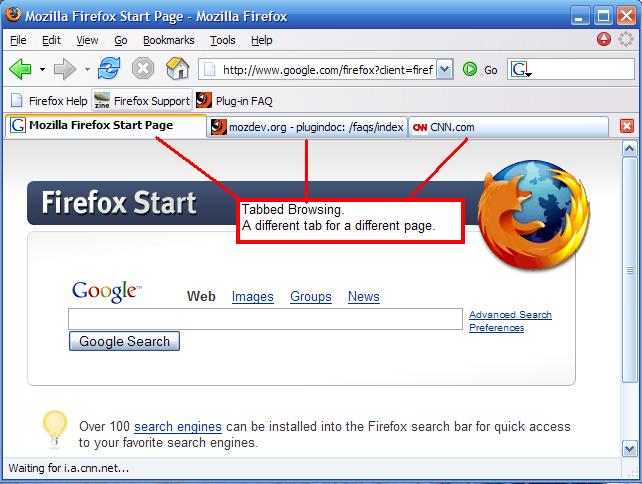
Tabbed browsing doesn’t seem to get the attention I think it deserves. Sites, strategy and brands will need to adjust as more and more of the early and late majority begin to use and understand tabbed browsing.

There was a lot of talk about how increased broadband usage would change the Internet landscape. The time it took to get from one site to the next was greatly reduced by the speed of connection. Yet, tabbed browsing takes that concept to the next level.

A 2006 article about tabbed browsing and its effect on web analytics framed the issue nicely.

Tabbed browsing has made comparing products, shopping for the right price, and researching products that much easier. For example, Chris is looking for a plasma television for his new home. He opens the browser and starts looking at ratings on Epinions. As he explores the ratings, he pops open links to pricing for a few different TVs in tabs. He decides to research a few different models on manufacturers’ sites.

The assumption is that review sites like Epinions or price comparison engines will continue to be the hub or start of any research on a product. I’m not sure this is a valid assumption. From my perspective, the de facto start to almost any (re)search for a product or service is a search engine – Google.

So what exactly does tabbed browsing mean to sites and brands?

Tabbed browsing means a greater focus on brand.

Users are going to be more apt to float from one site to the other for their purchases. The ‘switching costs’ of going from one site to the other is now virtually none. You want your site to be the first place users go or think of for your product or service. You’re also hoping that your brand is strong enough to suppress the tabbed browsing behavior.

The only way to circumvent Google is to have a site or brand that has a greater influence or mindshare for that niche. As an example, Amazon may still have the brand horse power to attract direct traffic for those looking for a book.

Strong brands don’t necessarily need to participate in shopping comparison sites since many users might simply check that brand’s offering in another tab whether or not they are displayed. Southwest airlines has largely taken this approach.

Tabbed browsing means user interfaces must be streamlined and easy.

Once you get a user to visit your site, the user interface must be incredibly easy. Confusion or roadblocks to purchase will give users time to open another tab. Whether it is to find another site with the same product or simply frustration induced ADD is immaterial. Sites must focus on making it difficult for users not to follow the appropriate conversion path. Lead generation marketers are a step ahead in figuring this out.

Tabbed browsing means sites need to invest in SEO.

If your brand isn’t strong enough to bring direct traffic the only way you can be first in the door is through search engine optimization. In addition, as users refine searches in subsequent tabs you want your site to continue to be served in the top results. Repetition will have a beneficial effect.

A new goal might be to have your site open in multiple tabs for any given user? And lets not forget that many confuse search with the address bar, pushing what could be direct traffic into searches. Weaker brands can leverage SEO against bigger brands.

Tabbed browsing means engagement is a better metric for success.

Engagement is going to become a much better metric for success since many will simply keep multiple sites open on a daily basis. I interact much more with FriendFeed but I usually still have Facebook and LinkedIn open in another tab. How this translates into online advertising is another interesting discussion.

Tabbed browsing could overwhelm users.

As people begin to use more and more tabs, it may lead to a backlash of sorts as it relates to Barry Schwartz’s The Paradox of Choice. Essentially, more choices doesn’t always lead to more purchases. In fact, in many cases it suppresses purchase behavior. This could mean a general deceleration in eCommerce growth or renewed reliance on trusted and/or known brands.

Google Chrome has upped the ante by creating a default tab page that includes your nine most visited pages. A quick survey of early adopters on FriendFeed shows the number of open tabs to be around 6 on average. I could argue for both fewer or more tabs on average for early and late majority users.

Time will tell. It is my opinion that tabbed browsing changes everything and we haven’t begun to determine how exactly it will play out.

Use Wordle as a Keyword Density Tool

September 23 2008 // SEO // 1 Comment

Keyword density is an easy way to tell search engines what your site is about. In other words, what words does the search engine find most often on your site or page or blog post. If you’re following my blind five year old principles you know how important this type of repetition is to a search engine.

There are plenty of tools you can use to figure out keyword density. However, most provide the results as a percentage which, while informative, doesn’t always help tell the whole story or provide the most impact. Instead, I suggest using Wordle.

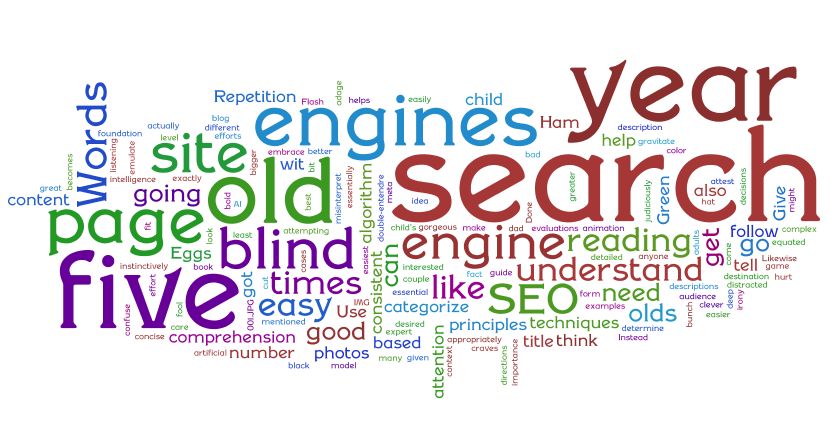
Wordle is a toy for generating “word clouds” from text that you provide. The clouds give greater prominence to words that appear more frequently in the source text. You can tweak your clouds with different fonts, layouts, and color schemes. The images you create with Wordle are yours to use however you like. You can print them out, or save them to the Wordle gallery to share with your friends.

Copying your blog post text and creating a Wordle word cloud makes it much easier to quickly determine how a search engine might interpret your content.

Once you create your Wordle word cloud you’re looking to see which words immediately jump out at you. This is what the search engine will see. It’s as easy as that.

Here’s a Wordle word cloud from my first blog post.

Here are some simple guidelines for using Wordle as a keyword density tool.

If no words immediately jump out, you’ve got a problem.

If the wrong words jump out (e.g. – your post is on ‘iPhone battery life’ and the words ‘refurbished ottoman chair’ are most prominent), you’ve got a problem.

To make it even more interesting, print out your Wordle and tape it to the wall, then take three big steps back and find out what you can still read. Once again, this is a good proxy for how your post will be received by search engines.

The visual nature of Wordle makes it easy to quickly determine if you’re on the right track. It’s not rocket science. You’re not measuring whether the density is 5% or 8%, you’re simply using the quick (and fun) visual technique to make sure you’re giving your content the best chance of being seen by interested users

It might not have been created as a keyword density tool, but Wordle is a great tool for the casual blogger who wants to do some basic search engine optimization.

Use the NOINDEX Tag If You ‘Blog For Yourself’

September 20 2008 // SEO // Comments Off on Use the NOINDEX Tag If You ‘Blog For Yourself’

Search Engine Optimization (SEO) seems to be a dirty word in some circles. Many seem to think it’s some vile technique that only marketers use in an effort to trick people to get to their site. (The word marketers is spoken as if they’re an unruly bunch of war criminals.) When pressed for why they don’t implement even basic SEO, many of these same people will state piously “I blog for myself!”

So I say to these people, please, use the NOINDEX Tag.

If you are blogging for yourself then there’s no real reason for you to be in Google’s search index, right? I mean, why exactly do you have a blog anyway? If you’re blogging for yourself couldn’t you just write it up in Microsoft Word, read it over again with a satisfied smile, pat yourself on the back and be happy? Tell Google and other search engines to ignore your blog and use the NOINDEX Tag.

Yes, I’m being very literal here, but it helps to make my point.

You’re not blogging only for yourself. You do want others to read what you’ve written. Not every SEO technique is something a casual blogger should employ. However, use my blind five year old principles to help implement rudimentary SEO. Not only will this help people find your content but it will likely make your content just a tad more readable and accessible.

And that is what SEO is about. It’s about making sure the people interested in your content actually find it.

Beware of MonkeyClicks

September 18 2008 // SEM + SEO // 6 Comments

When I started managing my first search engine marketing (SEM) program at Alibris I quickly found that being the first ad on a Google search result wasn’t working. It seemed a bit counter-intuitive. The volume was great but the conversion was atrocious. But I had a theory for this phenomenon that I quickly dubbed MonkeyClicks.

My MonkeyClicks theory is that a user tends to click on the first result on the page regardless of whether it really meets his or her needs. It is plain ol’ human behavior. A knee jerk reaction of sorts. So you get a tremendous amount of volume. However, that first click doesn’t always match the needs of the user and even if it does they will often return to the search results to determine whether other options exist.

If you think of this outside of the small world of search engine marketing it makes perfect sense. If I’m looking to buy a car I’m likely not going to look at the first advertisement I see and then run off and buy that car. If I’m looking to buy a new bicycle on Craigslist I’m going to look at a number of matching results, not just the first one.

This makes sense but lets back it up with some data. (I like data!) Back in 2006 AOL accidentally released a chunk of user search results. It showed that 42% of all clicks on the first page of results came from the first position. In comparison, the second position racked up a distant 12% of clicks.

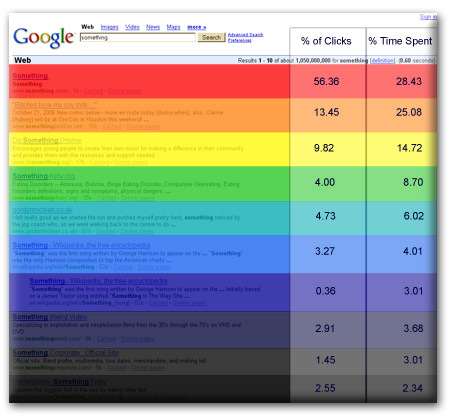
Another eye tracking study by Cornell, and reported by seoresearcher, showed the disparity in the % of clicks and % of time spent on each search result.

Google SERP Click Distribution

The ratio of clicks to time spent on the first position is a classic example of MonkeyClicks behavior. The first position garnered 56% of the clicks but only 28% of the time spent.

All of these studies are done with natural search results, but I’d argue that the paid results will look very similar. Not to mention that I’ve seen this time and again as I manage various SEM programs.

However, your mileage may vary! So don’t take my word for it, do a quick review of your own SEM program. If you’re running a Google AdWords program and Google Analytics, simply take a look at your Keyword Positions report.

And … beware of MonkeyClicks.