— You Are At The Archives for the SEO Tag —

11 Ways to Spot a Bad SEO Firm

June 02 2009 // SEO // 2 Comments

ripoff

There are a lot of bad SEO firms and consultants out there that make it more difficult for SEO to become a recognized and valuable part of every business.

I recently conducted a search for a SEO Manager at Caring.com and was bombarded with pitches from SEO firms and consultants. Based on this experience and some research I’ve come up with a list.

11 Ways to Spot a Bad SEO Firm

Rank Promise

Any SEO firm that promises you a number one ranking for any term before doing any keyword research or competitive analysis should be avoided.

Instant Results

SEO isn’t about what you can do in 30 days but a long-term plan to match your content with user queries. That’s not to say that progress won’t be made in the short-term, but beware of the get results fast pitch.

Network of Quality Links

A number of firms will claim that they have a “network of quality sites” that enable them to drive links back to your site. In general, these networks aren’t of such high quality and are often the target of web spam teams. Quality linkbuilding isn’t as easy as turning on a switch. It takes time and that’s why the links are valuable.

Submissions Bonanza

“We’ll submit you to over 500 search engine and directory sites!” Some of these engines and directories are valuable but most aren’t and may even wind up hurting you if it’s done in a zombie like fashion.

Inside Algorithm Knowledge

People at Google don’t hand out information about the algorithm. Anyone who says they have a ‘Deep Throat’ of search is likely wearning a tin-foil hat or running a scam.

Bad SEO

Visit the firm’s site and see if they’ve done a good job with their own SEO. Spot rudimentary SEO errors such as duplicate titles and you can write them off.

Adjectivitis

Throw a flag on the play if you see a site or pitch peppered with adjectives. For example: “Our talented optimizers use premiere methodologies to secure highly valuable links, elevating search engine presence and delivering targeted web traffic to your site.”

In my experience, the need to over sell your service is a sign that you’re not confident in your own ability.

Unsolicited Analysis

You might have received some of these emails. The firm has kindly done an analysis of your site and determined that you should be ranking higher for [insert term here]. Lucky for you, you can fix all that in no time at all by … [deleted]

Meaningless Statistics

Beware of statistics that have no basis in reality. “We outperform our nearest competitors 3 to 1 in the time it takes to get you ranked.” There are so many things wrong with that statement it makes my head hurt.

Bogus Testimonials

References and testimonials help sell many a service. Be on the look out for bogus testimonials on ‘neutral’ websites. It helps when they use their own name or do cut and paste with a fingerprint-like misspelling.

Repeated Robo-Emails

Sending the same email again and again based on a Craigslist ad is both annoying and a clear signal of desperation. Avoid these folks at all costs.

White Hat SEO

SEO isn’t about speed or automation. I’m not saying there aren’t efficiencies – there are. But the goal of SEO is to ensure that the content of your site is matched and being displayed to users for the right queries. That’s done in a myriad of ways – some small and some large.

Don’t be taken in by bad SEO. Use these tips and find firms and consultants who will give you a sound strategy and straight advice.

You’ll be doing yourself and me a favor.
Google Synonyms

May 30 2009 // SEO // 7 Comments

Google continues to build a synonym database to help deliver the best results for user queries. It’s not the most well documented or talked about feature but understanding synonyms can help your SEO efforts.

Use Synonyms to Increase Subject Density

Traditional keyword density revolves around the optimization for a specific keyword. A page on sofas would use modifiers or keyword clusters like ‘leather sofas’, ‘sofa beds’, ‘upholstered sofas’, and ‘sofa cushions’ as a way to increase density on the root keyword.

Using synonyms you can also increase the subject density of the page through supporting keywords like ‘couches’, ‘furniture’ and ‘chairs’. (Yes, chairs is currently a synonym for sofas.)

You’re not looking to make these synonyms the primary focus or most keyword dense words. Use them as supporting keywords to help Google to better understand the subject matter of the page.

How To Find Google Synonyms

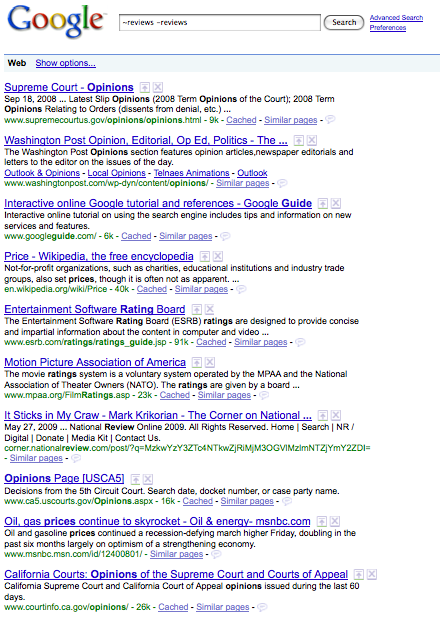
You can use the ~ operator to perform a synonym search. Coupled with a negative search for the same term and you can easily see the highlighted synonyms for that term. Here’s an example for the term ‘reviews’ (~reviews -reviews).

Google Synonyms

You’ll notice that ‘opinions’, ‘guide’, ‘rating’, and ‘prices’ are all highlighted and identified as synonyms.

There are also a few tools (here and here) that provide greater insight into synonym sets. SEO success is accomplished through doing a lot of little things right.

Synonyms are just one more way to help optimize your site and pages.

Did You Mean Matt Cutts?

May 15 2009 // SEO // Comments Off on Did You Mean Matt Cutts?

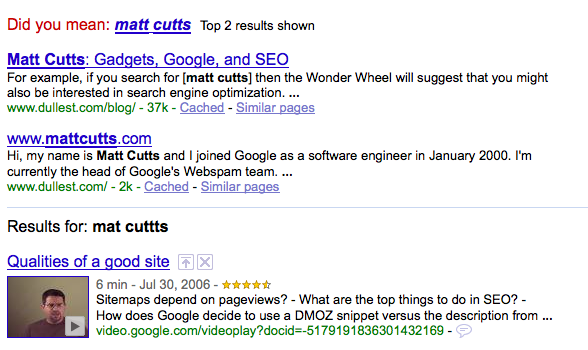
In February I wrote about Did You Mean search results appearing above normal Google search results. This differed from the presentation of just a link to the Did You Mean search results.

Did You Mean search results

Did You Mean Matt Cutts

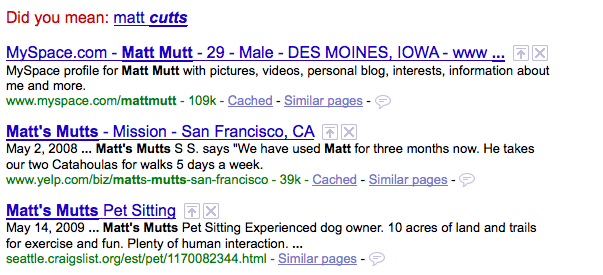
Did You Mean search link

Did You Mean Link

While I understood the potential user benefit, from an SEO perspective, Did You Mean search results could make misspelling optimization far less attractive.

As luck would have it I was able to get an answer on this topic from Matt Cutts.

It’s about what I expected. The presentation is relatively new and is tied to an algorithm triggered by some threshold where Google expects a high degree of accuracy in the Did You Mean match. In the end, it probably does deliver value to the user.

I appreciate the response (thanks Matt) and am reminded that SEO is an ever changing endeavor.

SEO 101: Dashes or Underscores?

April 23 2009 // SEO // 6 Comments

One of the first things someone new to search engine optimization (SEO) will ask is whether it’s better to use dashes or underscores in URLs.

dashes or underscores

Dashes or Underscores?

The short answer is: dashes.

Read on if you’re interested in why and some history behind the topic.

Back in 2005, Matt Cutts wrote about dashes versus underscores. At that time he recommended dashes.

… if you have a url like word1_word2, Google will only return that page if the user searches for word1_word2 (which almost never happens). If you have a url like word1-word2, that page can be returned for the searches word1, word2, and even “word1 word2″. That’s why I would always choose dashes instead of underscores.

To make it even more plain, the underscore joins the words together while the dash separates the words.

this_is_one_word

this-is-multiple-words

At WordCamp 2007 Cutts was reported to say that Google was going to begin treating underscores as separators. But Cutts clarified what he said in a follow-up blog post.

… I didn’t quite say that in the talk. I said that we had someone looking at that now. So I wouldn’t consider it a completely done deal at this point. But note that I also said if you’d already made your site with underscores, it probably wasn’t worth trying to migrate all your urls over to dashes. If you’re starting fresh, I’d still pick dashes.

This made it seem like Google might be working on a solution to the underscore issue which impacted a number of blogging platforms and other developers who use underscores out of habit.

The WordCamp talk clouded the topic and confused many. Some, despite the clarification, thought dashes and underscores were interchangeable. Others figured the fix was right around the corner, so it was safe to begin using dashes and underscores interchangeably. They were wrong.

At SMX West 2009 I sat in on two sessions in which the dashes versus underscores topic, yet again, surfaced. In both instances the panel unanimously recommended dashes. In fact, Maile Ohye’s presentation in the Technical SEO session included a slide in which the dash or hyphen was a recommended best practice.

Stephan Spencer got it straight from the horse’s mouth.

When I spoke to Matt in February at SMX West, he confirmed that underscores were NOT treated as word separators. According to Matt, this change is still in their queue but unlikely to happen before summer. My interpretation: don’t hold your breath, it’s between summer and never.

I concur with Stephan on this one, in part because I think Google has better and more interesting projects in the queue.

In the meantime …

Use dashes.

Longer Snippets and Meta Description Strategy

March 30 2009 // SEO // 1 Comment

Google recently announced that queries longer than three words would receive longer snippets. The theory being that the more detailed the query the more information necessary to provide context to the user.

This change comes right on the heels of research that shows that longer queries are becoming more frequent.

Do longer snippets change meta description strategy?

Probably not, but it’s a good time to review your meta description strategy.

First off, meta descriptions do matter. Even if they don’t have an impact on rank they will on your click through rate. The snippet, whether derived by Google or provided through a meta description, is where you ‘sell’ the listing.

Any PPC marketer will tell you that copy testing can have a significant impact on click through rate. The meta description is just a bigger block of copy. Use it.

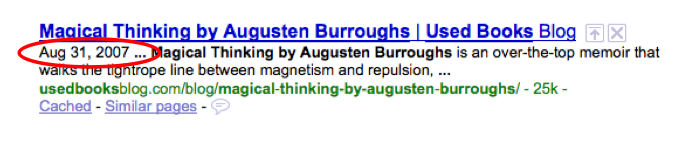
Date prefix

Currently, most write meta descriptions that are between 145 and 160 characters in length. However, the date prefix Google uses often interrupts a well crafted meta description. (Note that date prefixes are not searchable but are solely there as user signposts.)

You might want to think about writing shorter meta descriptions if you are consistently getting a date prefix.

date prefix meta description

The date prefix takes up 17 characters (including spaces) which means your total two line meta description should be 128 to 143 characters. For the sake of rounding go for between 130 and 140 characters.

Length or characters?

This doesn’t mean you won’t get the dreaded ellipse (…) at the end of your listing. The wrapping of a long word could push the second line beyond the max length. While we talk about characters, evidence suggests it’s about length instead. (That’s what she said!) I’ve seen 87 characters in a line, which seems impossible, but with parentheses and other thin characters … it fits.

Character length is still a good proxy until a tool delivers the ability to measure the actual length of each line of text.

New meta description tools

I’m surprised an AdWords-like tool (aka plugin) hasn’t been developed that would show what the listing would look like on Google. This wouldn’t be limited to meta description, but would provide a complete visual of your listing as it would appear on a Google SERP.

The tool would let you toggle the date prefix on or off and might even crack the length issue by determining the maximum pixel (px) line length. Just like AdWords, you’d see an example of your listing as you type. (It turns out SEOmofo has developed a SERP Snippet Optimization Tool.)

Should you write longer meta descriptions?

This assumes that Google will honor and display the full meta description provided instead of searching out relevant text on the page to match the query.

Given the opportunity, yes, I would want to control what the user reads. I want the ability to market my content the way I see fit. I think know I can do it better than Google. Here’s Exhibit A.

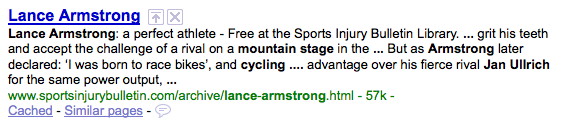
A search for ‘bicycling lance armstrong mountain stage jan ullrich’ returns this four line snippet.

Longer snippets

The longer snippet might display all of the keywords in my query but it doesn’t tell me a lot about what this page is really about. A longer meta description (even a regular one) might have done a better job.

Are longer snippets better?

Sometimes. If there’s no meta description in the first place then matching more keywords in the snippet would probably be an enhancement. If there is a meta description, I’d posit that the longer snippet degrades the experience.

The choppy nature of the snippet construction indicates that the keywords exist on the page but often fails to deliver the true context or topic of the page. A good meta description will do the latter.

Let the algorithm select the item based on the query terms but provide the human written meta description.

Will Google honor longer meta descriptions?

It doesn’t seem like Google will honor longer meta descriptions. If the longer meta description doesn’t contain the keywords from the query I’m guessing that Google will disregard the carefully crafted text and piece together its own snippet. In fact, it looks like they won’t even use the normal meta description.

But you know what they say about assuming. So I will test longer meta descriptions on this post and others and track what is displayed when searching with long queries.

Google Cache Crawl 404 Errors

March 13 2009 // Rant + SEO // 1 Comment

When is an error not really an error?

The other day Google Webmaster Tools informed one of my clients that it had found over 1,000 404 errors. Numerous Google folks (including Maile Ohye) have told me that an excess of 404s will adversely impact SEO.

Supporting this thesis and to help in tracking down these renegade links, Google has relatively new functionality that tells you what pages a 404 was linked from. Thank you Google.

Google Logo Cache

Very quickly I realized that all of the ‘linked from’ pages were cached pages. Pages with a discovery date of between four to six months ago. Internal pages. Pages that have since changed. In fact, pages that no longer have a link to the dead page.

No thank you Google.

Clearly it would have been nice if this client had 301 redirected all of these URLs. But when doing a major architecture change you’re often going to orphan a number of URLs. It happens. And if you’ve retired the links internally, and no external links existed, the pages essentially disappear.

Unless you’re crawling an out-of-date copy of the page.

Of course you can request a URL removal via Google Webmaster Tools. But am I really going to do this for 1,000 pages? It’s painful even if I can narrow it down using a directory or subdirectory.

Instead I can implement 301 redirects for the offending URLs. All for the sole purpose of ensuring that a cached crawl of internal pages doesn’t trip a 404.

Both of these options seem unnecessary.

If Google finds a 404 in a cached page why wouldn’t they seek out the original to verify that the problem currently exists? It seems like an easy business rule to implement and would likely reduce the volume of URL removal requests.

Is it that easy or am I missing something?

SEO Affirmative Action

March 07 2009 // SEO // 2 Comments

Is Google’s Vince Change SEO Affirmative Action?

Google Vince Update

The recent ‘Vince Change’ by Google has been discussed, debated and well documented by Aaron Wall. In essence, the Vince Change gave brands more trust for short queries.

At first, the Vince Change didn’t bother me too much. Change is part of the business (keeps many of us in business) and it seems a waste to get worked up by such things. But the more I thought about it the more it bugged me.

Google Taxonomic Search

Late last year I’d theorized that Google might be employing taxonomic limits to certain search results. I wrote about the topic in response to some reports of unusual SERP behavior for product searches.

The general idea surrounding taxonomic search is that Google wants an even distribution of site types on certain searches. For products you’d likely want the manufacturer as well as a few retailers, a few review sites, a few shopping comparison sites and a few discussion forums. Having the results dominated by any one type (regardless of SEO strength) would be a suboptimal user experience.

I’m a bit ambivalent on the idea of taxonomic search. It probably would provide a better user experience and it simply raises the bar for good SEO. I’m still not sure Google is doing this, but it’s more intriguing to think about with Google’s Vince Change.

Commercial Results

I kept mulling over the Vince Change, both in what it was and how it might have been implemented. Matt Cutts, whom I like a lot, provided an answer that discussed the former but not the latter.

The part that caught my attention was when Matt discussed the SERP for ‘eclipse’ and specifically his mention of “commercial results”. So is it not brand but commercial results that were impacted by the Vince Change? Is there a simple taxonomy of commercial versus non-commercial sites?

But the RankPulse results don’t really bear that out. There were plenty of other commercial sites there previously, they just didn’t have the same name recognition. I couldn’t shrug off the Vince Change.

Is trust assigned or earned?

If the Vince Change was about trust and authority, how did these brand sites receive trust and authority? Was it assigned or earned? If it was earned, how exactly was it earned? If it had been earned through SEO (backlinks, on-page optimization etc.) shouldn’t they have already been highly ranked?

I found it difficult to determine how you’d ‘turn the knob’ of trust and authority and only have it impact certain types of sites. “Certain types of sites” would lead naturally to a taxonomic structure of some sort. But that would be a transparent proxy for brand and I want to believe Matt what he says they didn’t target brands.

Instead, did Google simply assign this trust and authority? A type of SEO affirmative action. If so, based on what criteria? If it’s not ‘brand’, what is it? It doesn’t seem like traffic, nor does it seem to have roots in traditional SEO. As of SMX West it wasn’t SearchWiki data, but maybe that’s changed since. Google does move fast.

Or maybe it’s another piece of data? Advertiser saturation or CTR via DoubleClick? Could it be about money?

Why the Vince Change matters

The Vince Change seems to target very broad queries. While short queries are still a big and important part of SEO, the trend is toward longer search queries. Yet, the inability to determine how trust and authority pooled around these brands is unsettling. What prevents the same type of change to be implemented on long tail queries?

Brands should be required to earn their trust on a level playing field.

Are we … being hustled?

How To See What Googlebot Sees

March 04 2009 // SEO // 1 Comment

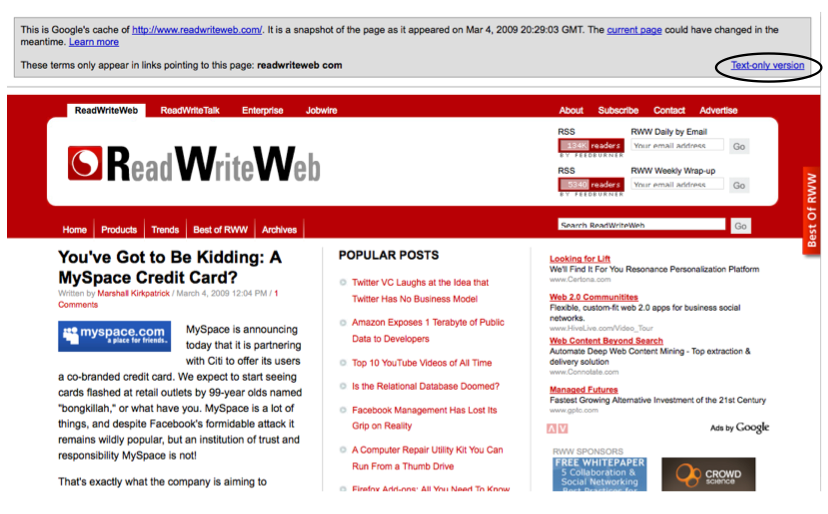
Use the text-only cached version of a page to see what Googlebot sees. Here’s how it works.

Let’s take a snapshot of ReadWriteWeb.

ReadWriteWeb

Next, find the page in a Google search result.

ReadWriteWeb Google Search Result

Click the cached link which brings you to the full version of the cached page. This will often be the same (Google is quick!) but it might be a slightly older version of the page.

ReadWriteWeb Google Cached

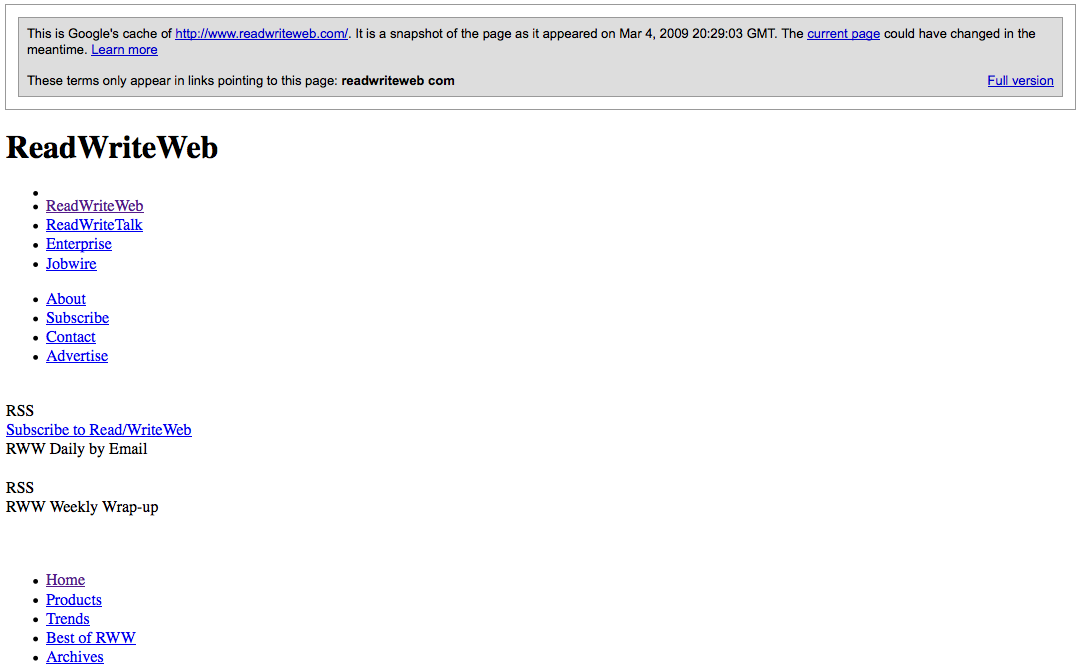
On the far right you’ll see a ‘Text-only version’ link. Click it and you’ll see what Googlebot sees.

ReadWriteWeb Google Cache Text Only Version

Googlebot doesn’t see pretty pictures, great graphic design or your spot-on color palette. This is why I tell clients to treat search engines like blind five year olds.

One of the main reasons you’ll want to do this is to ensure Googlebot sees all of your links. Those neat little drop down menus have to be done the right way. Google text-only cache is also a good way to eyeball the amount of text and number of links you have on a page. Both are important factors in good SEO.

A word of warning. This shouldn’t replace spider test tools like the aptly named SpiderTest, nor does it give a comprehensive view of what Googlebot sees. The Google text-only cache is a quick, complementary tool.

Thanks to Vanessa Fox who passed along this tip in a SMX West session.

Digital Discovery Is SEO

March 04 2009 // Rant + SEO // Comments Off on Digital Discovery Is SEO

Today I read Edelman Digital’s Five Digital Trends to Watch for 2009, curated by Steve Rubel. One of these five trends was ‘Digital Discovery’ or ‘The Power of Pull’.

For more than 100 years, marketers have largely focused on reaching stakeholders through push, e.g. paid and earned media. Now, however, in an age when Google dominates, it’s equally important that we turn our attention toward digital discoverability. This requires that brands create relevant content that people will “pull” through search engines and social networks.

Call it whatever you want, but Digital Discovery is just a fancy name for SEO.

I like Steve Rubel and find his blog posts informative and often thought-provoking. So why exactly is he carefully sidestepping the true craft of Search Engine Optimization? Why not call linkbait … linkbait? And is this actually a trend for 2009?  The ‘SEO for Press Releases’ session is a golden oldie on the search conference circuit.

Mr. Angry

So perhaps it’s the audience of public relations professionals who are late in adopting SEO that shaped the report? Do they view SEO as snake oil? That we’re all a bunch of hucksters? There are bad SEOs and good SEOs, just like you’ll find good PR flaks and bad PR flaks. It doesn’t mean that I begin to call public relations something like ‘brand maximization’.

It irks me. Steve is a respected voice in his industry and beyond. This was a missed opportunity to help change the perception of SEO.

Google Did You Mean Search Results

February 26 2009 // SEO // 1 Comment

Google is presenting two Did You Mean search results above regular search results, making misspelling optimization or fat finger SEO less effective.

used boks mispelling google search results

The result above is for used boks, a misspelling of used books. The Used Books Blog doesn’t get a ton of traffic from the term, but it’s been a steady trickle given that I’m the first result. (Take that Amazon!)

And I still might get some visits on the term, but I’d guess not nearly as much now that Google is actually presenting two Did You Mean results above the misspelled results.

I’m not sure when Google began to display Did You Mean search results, but it’s relatively new since I often use the used boks example with clients. And Google could be testing the feature, so it might disappear and revert to displaying the lone Did You Mean line at the top of the results.

In fact, there are other misspellings that don’t trigger the Did You Mean search results.

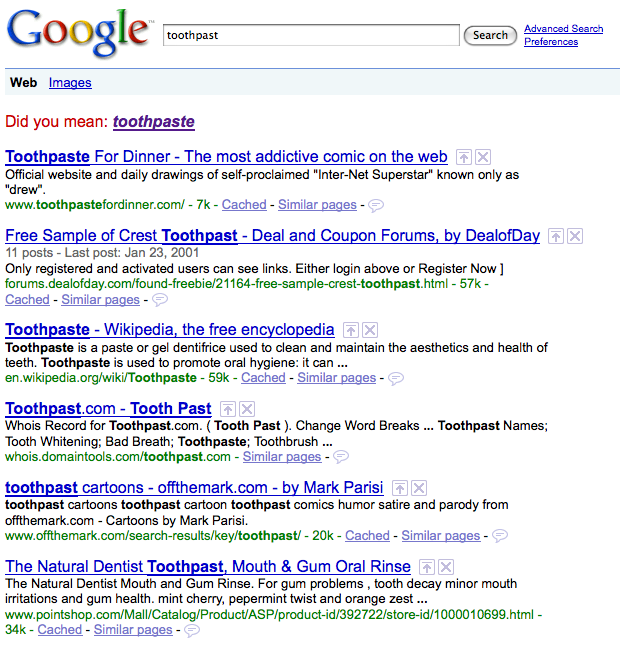
toothpast google search results

Come on! Toothpast doesn’t trigger Did You Mean search results but used boks does? At least used boks could refer to a used jersey worn by the Springboks, a successful South African rugby team nicknamed the Boks.

I’m not against the feature. In many cases it likely provides users with a better search experience. Is Google testing this new feature? Does it only present Did You Mean results on certain misspellings? If so, what’s the criteria?

I wouldn’t put misspellings near the top of my optimization list, but they are often non-competitive and with a little effort you can snag the top spot and drive qualified traffic.

Understanding Google’s new Did You Mean results could change the priority of or eliminate the need for misspelling optimization.