— You Are At The Archives for the Web Design Tag —

Comcast Upgrade Disrespects Customers

October 31 2009 // Rant + Technology + Web Design // 1 Comment

Saturday is bill paying day. One of those bills was Comcast. I’m signed up for automatic payments but I generally check to make sure everything is okay. I’m a bit paranoid that way and it usually only takes a few minutes with a cup of coffee steaming next to me to confirm that all is well.

Comcast was last on the list since I review my bills in reverse chronological order and the Comcast bill notification arrived in my inbox on Friday.

Comcast Fail

I clicked through on the bill and entered my user name.

comcast fail

I tried three times, paying special attention to ensure I didn’t fat finger something. Each time, same thing.

So I contacted customer support using their Live Chat feature. I was quickly connected with Vanessa who after a brief back and forth provided this explanation.

Vanessa > I wish to inform you that we did an upgrade with our system and we merged the 2 accounts which is the comcast.net and .com

Vanessa > And due to this upgrade since you do not have internet service I am afraid that you need to register it again online, AJ.

That makes as much sense as a fish riding a bicycle! To Vanessa’s credit she was apologetic (even though it wasn’t her fault) and very helpful. Thank you Vanessa.

Comcast System Upgrade?

I’m not an engineer or a coder, but I know enough to know that a database merge can be done far more elegantly. Boiled down, isn’t this a simple left outer join?

Even if there is more complexity (and there usually is) wouldn’t it be wise to deal with those issues instead of inconveniencing your customers?

Comcast Error Messaging

Even if Comcast chose to go ahead as planned, they could have avoided in-bound customer service issues by applying proper error messaging.

A simple statement about a system upgrade requiring users to re-register would have made the situation clear. Inconvenient but at least Comcast would have provided an immediate answer to the problem they created.

But here’s the rub. You need your account number to register!

That account number is not on the billing email and since I use paperless billing I have no material with my Comcast account number. No matter what, I’d still have to contact customer support to retrieve my account number.

Comcast Customer Service

Despite the buzz Comcast has generated around their use of Twitter they still don’t seem to understand customer service.

If they did, they’d have created use cases from a customer perspective and realized that this upgrade would be detrimental for users and would cause added customer support costs.

AT&T U-verse is looking better all the time.

Nofollow Change is about Usability

June 29 2009 // SEO + Web Design // 2 Comments

The SEO community was thrown into a tizzy by the announcement at SMX Advanced that Google had changed the way it dealt with nofollow links. The details were a bit fuzzy. Conjecture ran amok. Was nofollow page sculpting dead, or just crippled?

Nofollow page sculpting is dead

A post by Matt Cutts cleared up any confusion.

So what happens when you have a page with “ten PageRank points” and ten outgoing links, and five of those links are nofollowed? Let’s leave aside the decay factor to focus on the core part of the question. Originally, the five links without nofollow would have flowed two points of PageRank each (in essence, the nofollowed links didn’t count toward the denominator when dividing PageRank by the outdegree of the page). More than a year ago, Google changed how the PageRank flows so that the five links without nofollow would flow one point of PageRank each.

Lost Page Rank

The days in which you could hoard page rank or authority on a few links by nofollowing others is a thing of the past. (In fact, has been in the past for over a year!)

Instead, the page rank or authority on nofollow links is lost, falling into the equivalent of the Bermuda Triangle.

SEOmoz wrote up a great piece that illustrated this point and detailed ways in which you can continue to page sculpt without the use of nofollow. Though doing so might not be wise. Read on to find out why.

Nofollow change outrage

Many in the SEO industry became irate. They shouted and stomped their feet, decrying the whimsy of Google, who in 2005 introduced the nofollow concept, nurtured it (to a point) and changed the rules without notice.

The changing nature of SEO is what keeps most agencies, consultants and talking heads in business. If the algorithms were transparent and had been perfected then no one would need our services.

The truth is that the algorithms are a work in progress. Search Engines are like blind five year olds and, as such, are still learning. If you’re a parent, you know that as soon as you figure out how to deal with one problem your kid has moved on and given you another one to solve.

I mean, really, are you still grousing about how meta keywords are no longer important?

So why did Google make this change? Well, it wasn’t to target specific people or sites. And it wasn’t malicious or to make your life miserable. The truth is that the nofollow change is about usability and Google’s continuing efforts to make the web more useful for people.

Nofollow change is about usability

The problem with nofollow was that it didn’t allow the search engine to look at the page like a human being. If you nofollowed 20 links out of 25 on a page you were essentially telling Google that only 5 links existed.

But to a human being, all 25 links exist.

The fact that you were telling Google that those 5 links were what mattered most isn’t how a human being would interpret that page. This made Google unhappy.

Nofollow Design Guidelines

Yes, Google does have design and content guidelines.

Keep the links on a given page to a reasonable number (fewer than 100).

The nofollow change essentially means that they’re counting your nofollow links against that 100 link benchmark. Translation. Stop putting so many links on a page!

Many at Google point to Barry Schwartz’s The Paradox of Choice as a favorite in the Google Tech Talk series.

The one hour video is absolutely worth watching but, to make a long story short, more is not better because more makes it difficult for someone to make a choice.

The Paradox of Choice applies to web design and user experience too. In a time compressed society with broadband access and tabbed browsing, you have a limited amount of time to communicate what your site is about and where they should go next. Overwhelm your users and they’ll run screaming to the next tab.

Search engines are simply trying to emulate the human experience. That’s not an easy job. It’s essentially designing artificial intelligence! Remember, right now a search engine will always fail a reading comprehension test.

Instead, search engines have to model the ability of humans to parse a site. The nofollow attribute interrupted that model. It forced the search engine to see authority where a human user might not. The nofollow change removes this bias and also pushes sites to design according to that model by tossing nofollow page rank and authority into the Bermuda Triangle.

The real nofollow question

Google is serious about this mission, which is why it has begun to execute JavaScript, another favorite way to obfuscate links without using nofollow. There are still plenty of ways to hide links and sculpt your page rank or authority but it seems clear Google feels it needs to see all the links on a page to properly evaluate how it is being processed and interpreted by people.

The nofollow change is a not-so-subtle push to encourage sites to simplify. Not just so the search engine can better understand, but so people can better understand too.

The real question resulting from the nofollow change is far more thought-provoking.

How comfortable are you with Google shaping user experience?

Could Inconsistent Design Save Social Advertising?

March 23 2009 // Advertising + Marketing + Social Media // Comments Off on Could Inconsistent Design Save Social Advertising?

Social media sites like Digg, MySpace, Facebook and others are finding it difficult (to say the least) to get by using an advertising based revenue model. A drum beat of research shows that users don’t like the ads on these venues or simply don’t see them. The poor performance of these social ads translates into dreary CPM ad rates.

Social Advertising

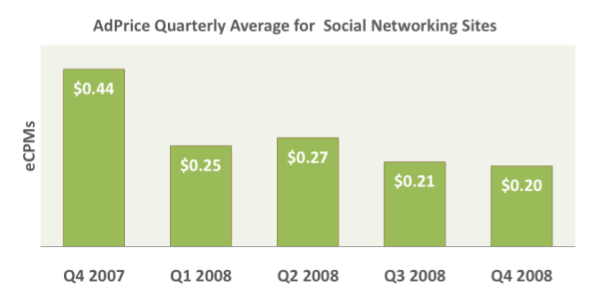
The Q4 2008 Pubmatic AdPrice Index (pdf) puts Social Networking sites at the bottom of all other verticals and the trend for Social Networking sites continues to slide.

social networking CPM q4 pubmatic adprice index

Many of these social sites have incredible engagement metrics. Users are there every day, multiple times a day and stay there for – sometimes – hours on end. You might think this would be a huge boon for potential advertisers. Yet, the exact opposite seems to be the case.

The Participatory Marketing Network (PMN) conducted a Generation Y study that detailed why “advertising remains a tough sell in these environments.”

84 percent noticed ads on social networks, 74 percent say they click infrequently/never (36 percent saying they don’t click on ads at all).

Then there’s a recent Nielsen study (pdf) of social networking users which showed that ‘false’ was the term most closely associated with ‘advertising’. Yeah … that’s not a good sign.

The high engagement on these sites means users become intimately aware of the structure of the site. They understand exactly where to look, how to navigate and what links to click.

The impetus for their visit compounds the problem. It is usually, and not surprisingly, social. Firing back responses to comments on your high school yearbook photo just isn’t the best advertising opportunity.

So while users may ‘notice’ ads I’m not sure they’re really ‘seeing’ them. They know where they are but they’re avoiding the advertising and they’re getting better and better at doing it.

Rearrange The Furniture

rearrange social media furniture

What if you made the navigation or design different. Not a major redesign but an ongoing number of smaller, incremental changes that break a user’s rote click pattern. Keep them on their toes!

Think of it as rearranging the furniture in a room. You’d still be able to find the couch, the coffee table, the chair and the TV, but it would all be just a little different. They’re in slightly different places or they’ve been reupholstered.

Wouldn’t that make you take stock of the entire room again? To get your bearings you’d see things you might have missed before. That picture on the wall that you hadn’t really looked at in ages?

Inconsistent Design

I’m not recommending something like this for just any site, but it makes sense for social sites where users become habituated to the design through repeated use. In these instances rearranging the furniture every month might help them see the paintings (aka banners) on the wall.

Is Facebook is seeing an increase in CTR since their much maligned redesign? Sure, 94% of users might be giving it a thumbs down but they’re looking at it with ‘new’ eyes. (Contact me if you had a campaign running during the redesign.)

A substantial redesign, nevermind the ruckus, wouldn’t scale well. Instead I’m thinking of smaller changes. It could be as big as moving columns or the order of top navigation or as small as a color change or resizing the logo.

The idea sounds radical even as I suggest it, but traditional techniques are not working. We take regular navigation off of lead generation and cart pages. Sure, that has more to do with keeping the user focused on a task, but it’s still a break in the natural design of the site.

Advertisers, by in large, still don’t understand how to market on social sites. I’m not sure any of us really know what’s going to work or not. So why not test inconsistent design, even if it’s a transitional measure?

Call To Action Button Size and Color

February 08 2009 // eCommerce + Marketing + Web Design // 3 Comments

In December I said that testing your call to action should be at the top of your New Year’s resolution list.

On the Internet the call to action often takes the form of a button. So while words still matter, there are other dimensions to consider.

Thinking about the size, shape, color, and placement (among other characteristics), our findings indicate that future testing could reveal surprising – and positive findings – based on changes to the download button.

That’s an excerpt from a post (The Download Button Drives Downloads) on the Mozilla Blog of Metrics. By the way, they’re absolutely right.

Call To Action Button Size

Your call to action buttons should be big and obvious. If you abide by Five Foot Web Design principles you should have no problem seeing the call to action when you take a few steps back from your monitor. If you can’t see it, your users are likely to miss it as well.

Here are a few examples of sites who got it right.

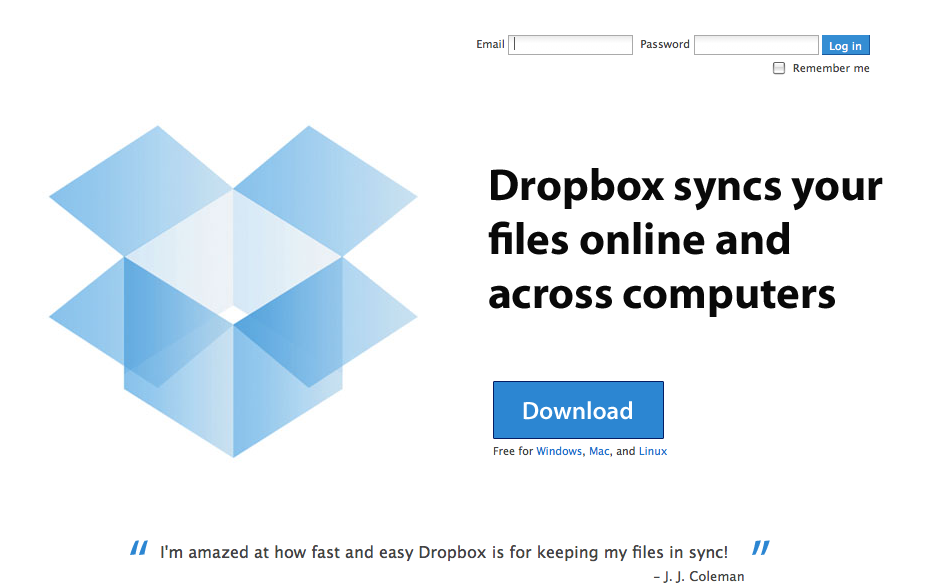
Dropbox

Dropbox Home Page

Intense Debate

Intense Debate Home Page

Songbird

Songbird Home Page

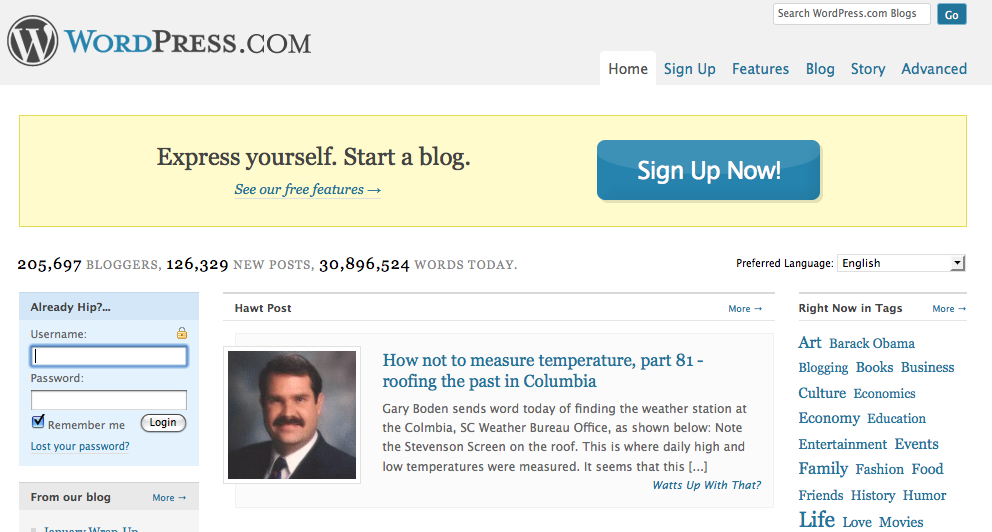
WordPress

Wordpress Home Page

Size can be relative based on the placement of the button and other design elements on the page. Your call to action button doesn’t always have to be huge but … you’re probably better off with it being bigger rather than smaller. (No jokes here please.)

Don’t be afraid to make your offer! Be confident. Not doing so is a subliminal sign to users that the product or offer isn’t valuable.

Call To Action Button Colors

Size is a relatively easy subject to tackle. The color of call to action buttons, on the other hand, is a hot topic. Jonathan Mendez (who you should be reading) touts the use of red in his 7 Rules for Landing Page Optimization.

Tell your brand team to go to hell and throw your styleguide out the window. Red buttons can by themselves raise your conversion rate. Green can be good as well but most times in our testing if color matters it is red that wins.

Not everyone agrees that red is the answer. And clearly none of the examples above took this advice to heart. Yet three out of four (Songbird being the outlier) have buttons that adhere to the site’s current styleguide and color palette. So who’s to say red wouldn’t provide a boost in conversion rate.

Why is color such a big deal?

Research reveals all human beings make a subconscious judgment about a person, environment, or item within 90 seconds of initial viewing and that between 62% and 90% of that assessment is based on color alone. [Institute for Color Research]

Each color is associated with different emotions and meanings. The ‘red’ debate revolves around whether the benefits of the color – passion, desire, excitement – outweigh the drawbacks – anger, danger and debt.

Red should be used sparingly, so as not to overwhelm users, and should also be first on your list of colors to test on your call to action button.

Lets face it. The speed of our society has accelerated and time is perhaps our most guarded resource. A site has a very short window to capture, retain and direct a user. So red doesn’t sound like a bad idea. In fact, any contrasting color might do the trick.

Ogilvy on Advertising

Less talked about is the color of the text on the call to action button.

David Ogilvy, often called the Father of Advertising, made black text famous in his book Ogilvy on Advertising. (Yes, the man practiced what he preached.)

Yet the overwhelming number of call to action buttons use white text on a colored background. Ogilvy would certainly have thrown a fit if he saw white text on black.

Three out of the four examples above (Songbird being the outlier again) use reversed out text. Is that a lost opportunity?

Don’t forget to try a black text version when testing your call to action button.

You’ve got nothing to lose and everything to gain by testing the words, size and color of your call to action buttons. It is one of the easiest things you can do to improve your business.

Call To Action. Read Now.

December 29 2008 // Marketing // 1 Comment

Read Now Call To Action Button

Test your call to action if you want to succeed in 2009.

Sure, you can work on your site design. Describe your product in new and better ways. Add testimonials. Get yourself a Twitter account. Try out a video tutorial. There are plenty of other things you can do in the quest for better conversion.

But testing your call to action should be at the top of your New Year’s resolution list.

The BusinessDirectory defines call to action as follows:

Words that urge the reader, listener, or viewer of a sales promotion message to take an immediate action, such as “Write Now,” “Call Now,” or (on Internet) “Click Here.” A retail advertisement or commercial without a call-to-action is considered incomplete and ineffective.

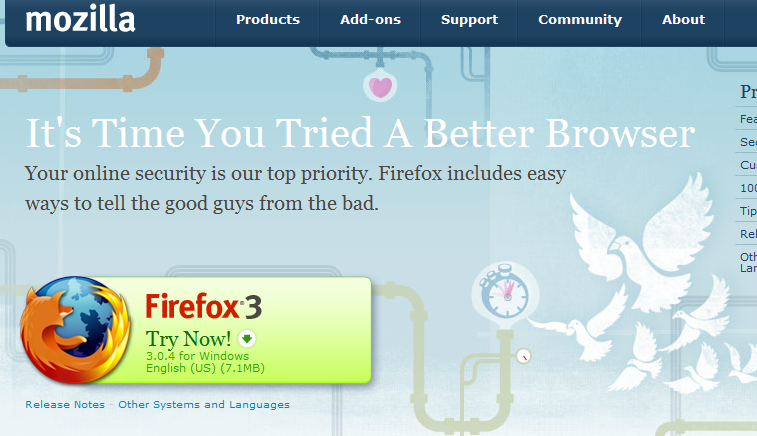
The Firefox team has been doing some testing and revealed the results in a post aptly titled The Download Button Drives Downloads. Using multivariate testing on the main Firefox product page, they found 4 of the 16 different variations performed significantly worse than the control or existing page.

The common thread among these four poor performers? The call to action on the download button. The four laggards used ‘Try Now’ while other variations used ‘Download’ and ‘Free Download’.

Firefox Try Now Call To Action Test

Words matter!

A call to action should be active, short and easy to understand. Simply tell them what you want them to do. Some are uncomfortable with this concept, thinking it’s a bit overkill. But it works. Keep it concrete and simple. Let natural consumer behavior take over.

Don’t get sucked into the idea that you or those you know won’t respond to this type of call to action. You’re wrong. You are not the target market and you likely have responded but simply don’t remember. The act of not remembering is, in some ways, the measure of success for a call to action.

Email marketers understand (or should) the power of subject lines. In the past I’ve seen a dramatic lift by simply inserting the call to action ‘open now’ at the beginning of the subject line. Sure it sounds a bit crass, but 10%+ lift can’t be ignored. And I doubt those people recall the overt ‘open now’ call to action.

Further evidence comes from a 2004 Advertising.com research study that analyzed the impact of various design elements in over 10 million impressions served for three unique advertisers.

Of the tested design elements, call-to-action had the greatest impact on performance — with Advertiser A experiencing an 85 percent lift in revenue earned per thousand impressions, or RPM, for banners with a call-to-action over those without. It was not surprising to find that the presence of a call-to-action impacted performance; however, the significant lift in RPM substantiates the importance of strong call-to-action messaging in banner ads.

In the web world the call to action is generally a button. In future posts I’ll discuss the importance and impact of size, color and placement on the call to action button.

Subscribe now to make sure you don’t miss these future installments. (See what I just did there?)

Five Foot Web Design

October 28 2008 // Marketing + SEO // 5 Comments

How do you make sure your message is getting across to users? Five foot web design.

Here’s how five foot web design works. Print out a nice color copy of the page in question. Tape it to the wall. Take a few steps back until you’re around … five feet away. What do you see? If you can’t make out the message then you might have a problem.

I’m no web design or user interface guru and I don’t pretend to have Jakob Nielsen’s experience or expertise. Instead I’m armed with the knowledge that you have a very short time to persuade someone to stay on a page. So don’t be coy. Don’t fill it up with a whole bunch of stuff. Keep it simple. Tell users exactly what your site or web page is about, what you want them to do and where to go next.

How do we get people to slow down on a street in the physical world? A sign. Let’s look at the ubiquitous yard sale sign. Which of the two signs below do you think is more effective?

No contest, right? The same rules apply on the information superhighway.

There are other real world examples that support five foot web design. My first job out of college was as an account coordinator at an ad agency. One of my tasks was writing up meeting notes. My first attempt was returned to me with more red on it than I’d seen in a long time. The message: say it with as few words as possible.

I also learned about one of their hiring techniques. Only the first page of a resume was reviewed. Any subsequent pages were thrown in the trash and never read. The lesson: brevity was and is critical, particularly in advertising.

Five foot web design simplifies your message and increases the odds that users will understand, remember and take action on that message. It will also help your search engine optimization (SEO) efforts.

The reason five foot web design supports SEO is that it forces you to use your keyword phrases prominently and to rely less on explanatory text and links. In short, it’ll help boost your keyword density.

You’ll need to use your headers wisely. Nice big H1s that don’t mince words. H2s and H3s that support your keyword(s). Strong anchor text. Judicious use of bold text. Strong call to action buttons. Keep it clean. White space is your friend.

Poker Copilot is a good example of five foot web design. Recently, they switched to much larger buttons in hopes of increasing downloads.

The spike at the end of the graph says it all. Spike is not even an adequate word here. It’s a kangaroo leap to a new level.

I also recommend the book Don’t Make Me Think by Steve Krug which presents a more detailed look at web design that dovetails nicely with five foot web design.

In lieu of additional reading, simply take a moment to step back from the computer, or roll back in your chair, and see if your site is befitting from five foot web design.