— You Are At The Archives for the search engine optimization Tag —

Pipes versus Dashes

September 28 2009 // SEO // 1 Comment

Pipes versus Dashes

At SMX West 2009 Bruce Clay stated that Yahoo! didn’t ‘like’ pipes. I’m a big fan of pipes so I made a beeline for the Yahoo! representative at the show and he was nonplussed. He saw no reason why Yahoo! would treat pipes any different than dashes.

pipes vs dashes

What are pipes and dashes?

I’m talking about the delimiter used in the title tag, which ultimately shows up as the first line in your search engine result. The two most frequently used title tag delimiters are pipes and dashes.

Are pipes better than dashes?

So, it seemed like Yahoo! had no preference but what about Google? I asked Matt Cutts and got the following video reply. (Thanks Matt.)

The answer seems to be the same. Google most likely handles pipes the same way it does dashes.

Do users prefer dashes or pipes?

Matt brings up an interesting point surrounding click through rates on pipes versus dashes. And maybe that’s what Bruce was referring to – a study of click through behavior, specifically on Yahoo!

The real problem is you can’t really do an A/B test like you can on AdWords. But wouldn’t that be an incredible tool Google could provide through … say, Webmaster Tools! Because what you’d really want to do is take the same URL and send half of the traffic to one treatment and half to another.

In the interim I suppose you could conduct an eye tracking study. But Matt’s probably right, there’s likely little to no difference. Until then you can feel safe using both pipes or dashes for your title optimization.

Short Clicks versus Long Clicks

September 22 2009 // SEO // 17 Comments

Long Clicks vs Short Clicks

Google wants to see long clicks not short clicks. That’s the new SEO terminology coming from Google.

What’s a Long Click?

A long click occurs when a user performs a search, clicks through on a result and remains on that site for a long time. They don’t come back to the result set immediately to click on another result or to refine their query. In general, long clicks are a proxy for satisfaction and success.

What’s a Short Click?

A short click is the opposite of a long click. (No duh!) A short click occurs when a user performs a search, clicks through on a result and quickly comes back to the result set to click on an alternate result. In general, short clicks are a proxy for dissatisfaction and failure.

How is Google Tracking Click Length?

No, it’s not through Google Analytics. They’re not peeking at bounce rates. Instead Google is measuring pogosticking activity by leveraging their current tracking mechanisms. Remember, Google already tracks the user, the search and the result clicked. All Google needed to do was to accurately model the time dimension.

Why are Long Clicks Important?

Long clicks are important to Google because it gives them a way to measure the satisfaction of the result based on downstream behavior. Sure, a result might get a lot of clicks but did it actually satisfy the query?

Is it a success if 100 people click but 98 go back within 10 seconds? What if those 98 people all clicked on an alternate result?

Google knows that the search algorithm still isn’t that smart. It routinely makes mistakes and can often be led down the wrong path by aggressive search engine optimization. Long clicks provide a feedback mechanism, a type of human quality assurance that is lacking in the algorithm.

Long clicks are important to you because they will may help increase your SERP rank.

The chatter from Google makes me believe that it is part of the algorithm. How much it is weighted now and in the future remains to be seen. One way or the other Google is saying that longer is better.

Image Based Google Shopping OneBox

September 18 2009 // SEO // 2 Comments

Starting Monday, Google began to display an image based shopping OneBox, changing the SEO landscape for any product or eCommerce related site. The shopping OneBox seems to be in high rotation, usually appears within the top three results, takes up more vertical real estate and has broad coverage over product searches.

What is a Google OneBox?

When Google wants to display information that is not exactly in the algorithm, but is related to the query, it does so through what is called a OneBox presentation. Think of it as a promotional unit.

The OneBox terminology was used by Google when the unit was first introduced and seems to have survived, at least externally. SearchEngineWatch (sorta) confirmed the OneBox terminology in an interview with Google Product Marketing Director Debbie Jaffe in 2006. (Jaffe never actually refers to it as OneBox.)

OneBox can display a variety of different information from news to weather to books to products and can be placed anywhere from the top to the bottom of a result page.

The OneBox presentation is controversial because it creates a very prominent listing that provides … cherry-picked results. As an example, Google has begun to implement a health OneBox.

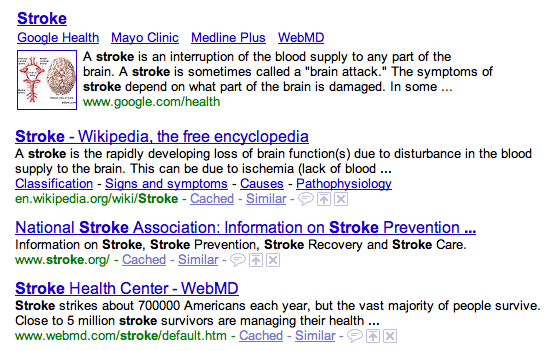
Google Health OneBox

The health OneBox for the query ‘stroke’ brings Mayo Clinic, Medline Plus and WebMD to the top of the page instead of where they’d wind up under natural results. In this case WebMD would be 3rd, Medline Plus 6th and Mayo Clinic 11th.

Google Shopping OneBox

The shopping OneBox or product OneBox brings the same cherry-picking controversy to the surface. It’s exacerbated by the fact that Google Product Search essentially competes with shopping comparison engines and review sites, many of whom have spent time and effort to perform search engine optimization.

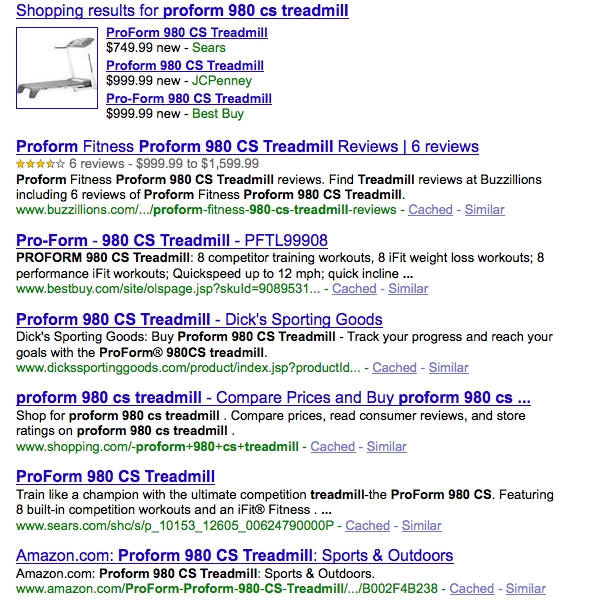
If you’re not participating in Google Product Search (aka Google Base) then you’re never going to be in the shopping OneBox. And even if you do participate, there’s no guarantee that your listing will be featured. Here’s an example of the shopping OneBox for the query ‘proform 980 cs treadmill’.

Google Shopping OneBox

Sears, JCPenney and Best Buy are all featured in the shopping OneBox. At least Sears and Best Buy have a natural listing but JCPenney has essentially circumvented normal SEO and is now a preferred result for this query.

Sites such as Buzzillions, Dick’s Sporting Goods, Shopping.com and even Amazon suddenly lose out on this query despite matching and delivering a very good experience for this product search. Even Best Buy might not be thrilled since they’d be first retailer listed and not the third if the OneBox wasn’t presented.

Today, Google is a huge part of any product based business, so changes like this will have an immediate impact on traffic and sales.

Shopping OneBox Evolution

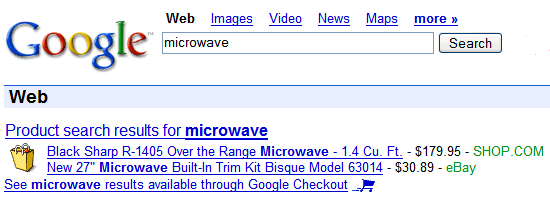
The evolution of the shopping OneBox shows an increasing interest by Google in this vertical. First there was the old Froogle presentation.

Froogle OneBox

Image from Google Operating System.

In 2008 Google experimented with a compact version with a product image.

Google Shopping OneBox 2008

Image from Google Operating System.

By early 2009 Google had reverted to a slightly less compact text version again.

Google Base Results

Image from Best Rank.

Now the shopping OneBox has a large product image and is not compact at all, taking up a tremendous amount of real estate.

Google Shopping OneBox 2009

Importance of Shopping OneBox

On September 2nd, the Google Base blog announced new features for marketplace and aggregators on Google Product Search. This is a real change from the initial launch of Google Base, where Google seemed interested in having individual sellers upload to Base and use Google Checkout on their sites – middlemen be damned!

The change in direction for Google Base coupled with the focus Bing has had on shopping seem to have accelerated Google’s interest in the vertical. They’ve been toying with it for many years but have never really made it a priority.

The new shopping OneBox indicates that might be changing.

SEO 101: Dashes or Underscores?

April 23 2009 // SEO // 6 Comments

One of the first things someone new to search engine optimization (SEO) will ask is whether it’s better to use dashes or underscores in URLs.

dashes or underscores

Dashes or Underscores?

The short answer is: dashes.

Read on if you’re interested in why and some history behind the topic.

Back in 2005, Matt Cutts wrote about dashes versus underscores. At that time he recommended dashes.

… if you have a url like word1_word2, Google will only return that page if the user searches for word1_word2 (which almost never happens). If you have a url like word1-word2, that page can be returned for the searches word1, word2, and even “word1 word2″. That’s why I would always choose dashes instead of underscores.

To make it even more plain, the underscore joins the words together while the dash separates the words.

this_is_one_word

this-is-multiple-words

At WordCamp 2007 Cutts was reported to say that Google was going to begin treating underscores as separators. But Cutts clarified what he said in a follow-up blog post.

… I didn’t quite say that in the talk. I said that we had someone looking at that now. So I wouldn’t consider it a completely done deal at this point. But note that I also said if you’d already made your site with underscores, it probably wasn’t worth trying to migrate all your urls over to dashes. If you’re starting fresh, I’d still pick dashes.

This made it seem like Google might be working on a solution to the underscore issue which impacted a number of blogging platforms and other developers who use underscores out of habit.

The WordCamp talk clouded the topic and confused many. Some, despite the clarification, thought dashes and underscores were interchangeable. Others figured the fix was right around the corner, so it was safe to begin using dashes and underscores interchangeably. They were wrong.

At SMX West 2009 I sat in on two sessions in which the dashes versus underscores topic, yet again, surfaced. In both instances the panel unanimously recommended dashes. In fact, Maile Ohye’s presentation in the Technical SEO session included a slide in which the dash or hyphen was a recommended best practice.

Stephan Spencer got it straight from the horse’s mouth.

When I spoke to Matt in February at SMX West, he confirmed that underscores were NOT treated as word separators. According to Matt, this change is still in their queue but unlikely to happen before summer. My interpretation: don’t hold your breath, it’s between summer and never.

I concur with Stephan on this one, in part because I think Google has better and more interesting projects in the queue.

In the meantime …

Use dashes.

Longer Snippets and Meta Description Strategy

March 30 2009 // SEO // 1 Comment

Google recently announced that queries longer than three words would receive longer snippets. The theory being that the more detailed the query the more information necessary to provide context to the user.

This change comes right on the heels of research that shows that longer queries are becoming more frequent.

Do longer snippets change meta description strategy?

Probably not, but it’s a good time to review your meta description strategy.

First off, meta descriptions do matter. Even if they don’t have an impact on rank they will on your click through rate. The snippet, whether derived by Google or provided through a meta description, is where you ‘sell’ the listing.

Any PPC marketer will tell you that copy testing can have a significant impact on click through rate. The meta description is just a bigger block of copy. Use it.

Date prefix

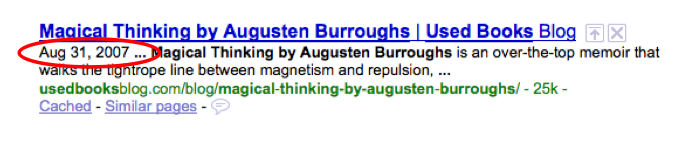
Currently, most write meta descriptions that are between 145 and 160 characters in length. However, the date prefix Google uses often interrupts a well crafted meta description. (Note that date prefixes are not searchable but are solely there as user signposts.)

You might want to think about writing shorter meta descriptions if you are consistently getting a date prefix.
date prefix meta description

The date prefix takes up 17 characters (including spaces) which means your total two line meta description should be 128 to 143 characters. For the sake of rounding go for between 130 and 140 characters.

Length or characters?

This doesn’t mean you won’t get the dreaded ellipse (…) at the end of your listing. The wrapping of a long word could push the second line beyond the max length. While we talk about characters, evidence suggests it’s about length instead. (That’s what she said!) I’ve seen 87 characters in a line, which seems impossible, but with parentheses and other thin characters … it fits.

Character length is still a good proxy until a tool delivers the ability to measure the actual length of each line of text.

New meta description tools

I’m surprised an AdWords-like tool (aka plugin) hasn’t been developed that would show what the listing would look like on Google. This wouldn’t be limited to meta description, but would provide a complete visual of your listing as it would appear on a Google SERP.

The tool would let you toggle the date prefix on or off and might even crack the length issue by determining the maximum pixel (px) line length. Just like AdWords, you’d see an example of your listing as you type. (It turns out SEOmofo has developed a SERP Snippet Optimization Tool.)

Should you write longer meta descriptions?

This assumes that Google will honor and display the full meta description provided instead of searching out relevant text on the page to match the query.

Given the opportunity, yes, I would want to control what the user reads. I want the ability to market my content the way I see fit. I think know I can do it better than Google. Here’s Exhibit A.

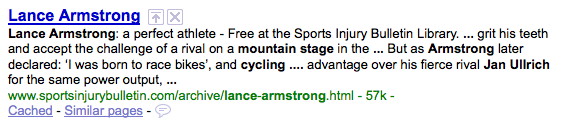
A search for ‘bicycling lance armstrong mountain stage jan ullrich’ returns this four line snippet.
Longer snippets

The longer snippet might display all of the keywords in my query but it doesn’t tell me a lot about what this page is really about. A longer meta description (even a regular one) might have done a better job.

Are longer snippets better?

Sometimes. If there’s no meta description in the first place then matching more keywords in the snippet would probably be an enhancement. If there is a meta description, I’d posit that the longer snippet degrades the experience.

The choppy nature of the snippet construction indicates that the keywords exist on the page but often fails to deliver the true context or topic of the page. A good meta description will do the latter.

Let the algorithm select the item based on the query terms but provide the human written meta description.

Will Google honor longer meta descriptions?

It doesn’t seem like Google will honor longer meta descriptions. If the longer meta description doesn’t contain the keywords from the query I’m guessing that Google will disregard the carefully crafted text and piece together its own snippet. In fact, it looks like they won’t even use the normal meta description.

But you know what they say about assuming. So I will test longer meta descriptions on this post and others and track what is displayed when searching with long queries.

How To See What Googlebot Sees

March 04 2009 // SEO // 1 Comment

Use the text-only cached version of a page to see what Googlebot sees. Here’s how it works.

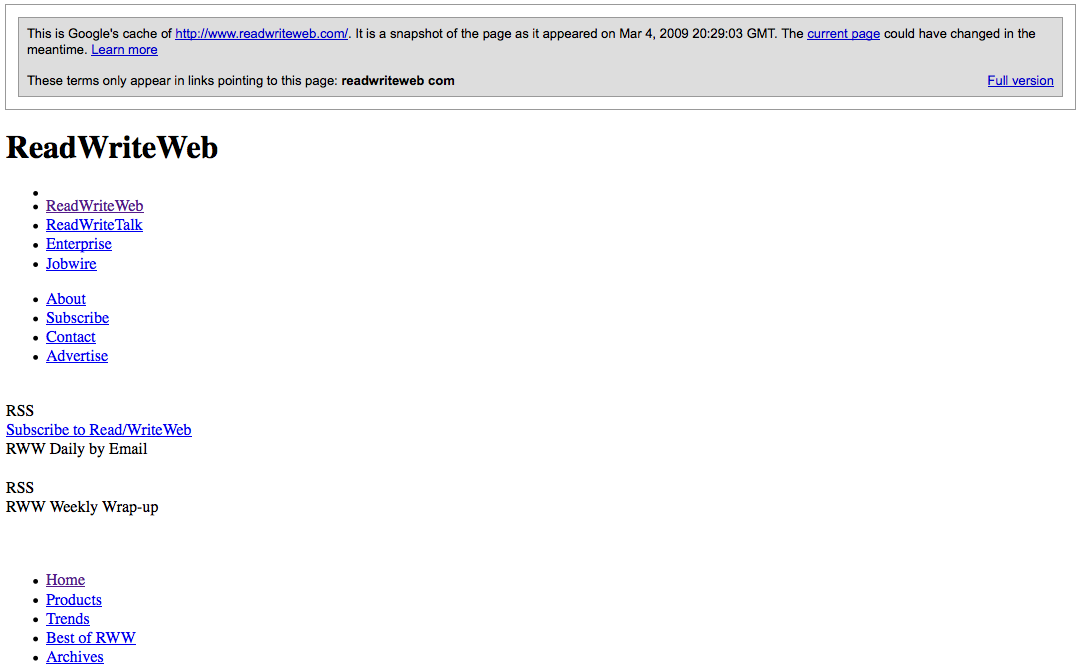
Let’s take a snapshot of ReadWriteWeb.

ReadWriteWeb

Next, find the page in a Google search result.

ReadWriteWeb Google Search Result

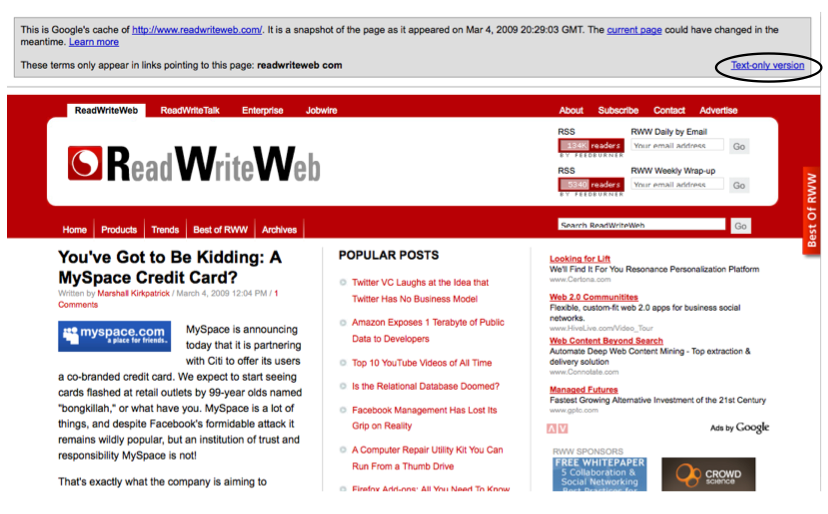
Click the cached link which brings you to the full version of the cached page. This will often be the same (Google is quick!) but it might be a slightly older version of the page.

ReadWriteWeb Google Cached

On the far right you’ll see a ‘Text-only version’ link. Click it and you’ll see what Googlebot sees.

ReadWriteWeb Google Cache Text Only Version

Googlebot doesn’t see pretty pictures, great graphic design or your spot-on color palette. This is why I tell clients to treat search engines like blind five year olds.

One of the main reasons you’ll want to do this is to ensure Googlebot sees all of your links. Those neat little drop down menus have to be done the right way. Google text-only cache is also a good way to eyeball the amount of text and number of links you have on a page. Both are important factors in good SEO.

A word of warning. This shouldn’t replace spider test tools like the aptly named SpiderTest, nor does it give a comprehensive view of what Googlebot sees. The Google text-only cache is a quick, complementary tool.

Thanks to Vanessa Fox who passed along this tip in a SMX West session.

Digital Discovery Is SEO

March 04 2009 // Rant + SEO // Comments Off on Digital Discovery Is SEO

Today I read Edelman Digital’s Five Digital Trends to Watch for 2009, curated by Steve Rubel. One of these five trends was ‘Digital Discovery’ or ‘The Power of Pull’.

For more than 100 years, marketers have largely focused on reaching stakeholders through push, e.g. paid and earned media. Now, however, in an age when Google dominates, it’s equally important that we turn our attention toward digital discoverability. This requires that brands create relevant content that people will “pull” through search engines and social networks.

Call it whatever you want, but Digital Discovery is just a fancy name for SEO.

I like Steve Rubel and find his blog posts informative and often thought-provoking. So why exactly is he carefully sidestepping the true craft of Search Engine Optimization? Why not call linkbait … linkbait? And is this actually a trend for 2009?  The ‘SEO for Press Releases’ session is a golden oldie on the search conference circuit.

Mr. Angry

So perhaps it’s the audience of public relations professionals who are late in adopting SEO that shaped the report? Do they view SEO as snake oil? That we’re all a bunch of hucksters? There are bad SEOs and good SEOs, just like you’ll find good PR flaks and bad PR flaks. It doesn’t mean that I begin to call public relations something like ‘brand maximization’.

It irks me. Steve is a respected voice in his industry and beyond. This was a missed opportunity to help change the perception of SEO.

Google Did You Mean Search Results

February 26 2009 // SEO // 1 Comment

Google is presenting two Did You Mean search results above regular search results, making misspelling optimization or fat finger SEO less effective.

used boks mispelling google search results

The result above is for used boks, a misspelling of used books. The Used Books Blog doesn’t get a ton of traffic from the term, but it’s been a steady trickle given that I’m the first result. (Take that Amazon!)

And I still might get some visits on the term, but I’d guess not nearly as much now that Google is actually presenting two Did You Mean results above the misspelled results.

I’m not sure when Google began to display Did You Mean search results, but it’s relatively new since I often use the used boks example with clients. And Google could be testing the feature, so it might disappear and revert to displaying the lone Did You Mean line at the top of the results.

In fact, there are other misspellings that don’t trigger the Did You Mean search results.

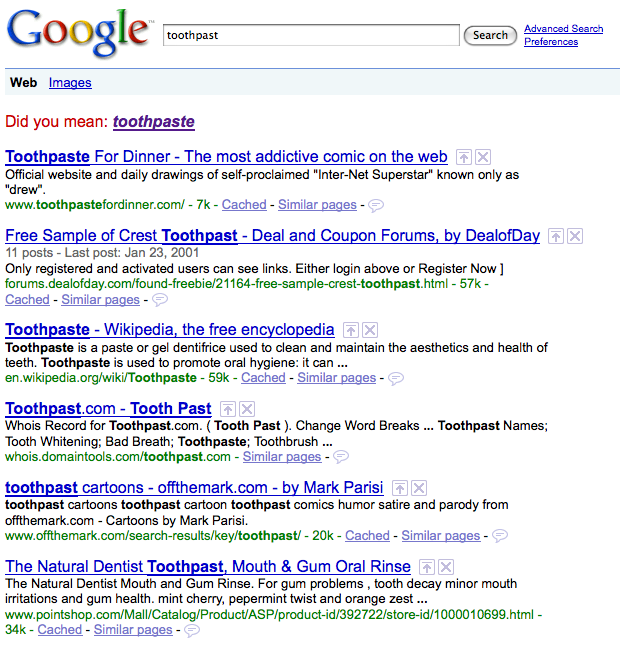
toothpast google search results

Come on! Toothpast doesn’t trigger Did You Mean search results but used boks does? At least used boks could refer to a used jersey worn by the Springboks, a successful South African rugby team nicknamed the Boks.

I’m not against the feature. In many cases it likely provides users with a better search experience. Is Google testing this new feature? Does it only present Did You Mean results on certain misspellings? If so, what’s the criteria?

I wouldn’t put misspellings near the top of my optimization list, but they are often non-competitive and with a little effort you can snag the top spot and drive qualified traffic.

Understanding Google’s new Did You Mean results could change the priority of or eliminate the need for misspelling optimization.

SearchWiki Not a Signal in Search Algorithm … Yet

February 17 2009 // SEO // 1 Comment

google top secret logo

Launched in November 2008, SearchWiki lets you move, delete, add and comment on the results of a Google search. At launch I wrote that SearchWiki turned us into mechanical turks. That’s not a bad thing since the Google algorithm needs a human tutor.

Google’s SearchWiki feature has been a lighting rod within the search industry drawing the ire of many and prompting the creation of Greasemonkey scripts to turn off SearchWiki functionality. It even spilled over into ‘mainstream’ media with TechCrunch’s Michael Arrington asking Google to shelve the new feature.

So it was no surprise that the SMX West presentation on SearchWiki was well attended and full of search engine marketers eager to learn what exactly Google was up to with SearchWiki. Corey Anderson started out by giving a short presentation, outlining the four different uses of SearchWiki.

  • Bookmarking
  • Improving proper name searches
  • Collecting information on a task
  • Refinding hard-to-find information

The presentation didn’t satisfy or answer the obvious questions. What ensued was a President George Bush type of press conference where reporters asked the same question over and over in slightly different ways and got back the same ‘no comment’ answer in return. You could come away from the SearchWiki session thinking you’d learned nothing or you could read between the lines and learn a lot.

Anderson stated that SearchWiki data wasn’t a signal in the Google search algorithm “right now”. He was, however, noticeably excited by all the data they were collecting. The task ahead was to sift through the data to determine if it could be turned into information and used as a signal.

While Anderson made it clear Google felt SearchWiki was a benefit to users on its face, there is no doubt that Google is interested in the possibility of using SearchWiki data as a search algorithm signal.

SearchWiki usage numbers were something Anderson wasn’t willing to divulge. It’s not that he didn’t know them, he just wasn’t willing or able to share them. He noted that Google was “comfortable” with SearchWiki usage. The crowd full of metric junkies let out a mirthless chuckle and groan at this ultra-fuzzy term.

Anderson did mention that they had been testing different visual treatments to boost engagement and usage of SearchWiki. Obviously you need to measure usage to determine which visual treatment is performing better than the other. Google knows, they’re just not willing to tell us “right now”.

If SearchWiki weren’t important, there wouldn’t be this deliberate and careful black hole of information. I don’t blame Google or Anderson. SearchWiki provides a very rich new stream of data. The potential for data pollution is problematic. Usage numbers only help those looking to hide unnatural edits from detection.

SearchWiki data isn’t a signal in the algorithm now, but the SMX West 2009 presentation made it crystal clear that they reserve the right to use it in the future.

9 Reasons You Should Have Been at SMX West

February 14 2009 // SEM + SEO // 1 Comment

SMX West 2009

I’m not the biggest fan of conferences. The information is often stale, vendors seem to outnumber attendees, and the speakers are cordoned off making it more like attending a guided tour at a very boring zoo.

But SMX West was different and absolutely worthwhile. Here’s why.

Big Brains

There were a lot of smart people at SMX West. Savvy search engine marketers and an accessible bunch of representatives from the major search engines. Getting to hear Vint Cerf speak was also a treat. However, upon exiting I heard someone on a cell phone talking about Cerf’s keynote. “Yeah, some guy from Google, he was pretty good.” Like I said, a lot of smart people, not all.

Big Ideas

Danny Sullivan kicked it off by asking Google to essentially blow up the black box surrounding AdWords and AdSense. Imagine going back to a transparent Overture like bidding system. Or knowing exactly what the revenue share was on AdSense.

Vint Cerf shocked everyone when he spoke about an interplanetary network which would be operational this year. But it was the idea of ‘bit rot’ that I found most interesting. How do we ensure that information from today can be read in the far future? Hey, I have some old MacPaint files still hanging around!

Finally, Matt Cutts announced a new ‘canonical’ link tag that serves as a sort of mini-301 redirect aimed at reducing the amount of duplicate content. Even better, the three major search engines have all agreed to use the new ‘canonical’ link tag.

Cloak and Dagger

Search engine representatives versus search engine marketers, some of which have used less than white hat techniques to gain traffic and rank. Panelists often seemed to be addressing Matt Cutts directly as they spoke about their techniques, looking at him for any response or reaction. This dance was, in itself, interesting to watch but it was the session about Google’s SearchWiki and Personalized Search that really seemed like something out of a Jason Bourne movie. You could learn a lot if you read between the lines.

Camaraderie

The amount of good will in the search industry is extremely high. I witnessed Michael Gray and Rae Hoffman giving constructive feedback to Corey Anderson and Bryan Horling who presented at the SearchWiki session. And those with power strips were generous and helped many to keep the juice flowing. Everyone seems to realize that this is a small ecosystem in which both sides must flourish.

Star Gazing

There were some high profile folks at SMX West. I’m not one to be bowled over by notoriety, titles or fame (hey, people are people), but it is interesting to see some of the more well known folks close up. You can’t help but smile at Rae Hoffman’s exuberance, be swayed by Rand Fishkin’s giddy passion or meet a nicer guy than Matt Cutts.

samantha fox

Answers

You get what might be the final word on topics like dashes versus underscores or relative versus absolute. And not just a whisper-down-the-lane opinion but right from the mouth of Maile Oyhe or from the seemingly tireless Vanessa Fox, who oddly and continually triggers the distracting image of Samantha Fox in my mind.

Numbers

Data jockeys galore roam the conference rooms and hallways. Numbers and statistics are often central to the presentations. Leverage the combined research power of the panelists to deliver meaningful up-to-date statistics such as the percentage of traffic that comes from being on page one or the click distribution between organic and paid on SERPs.

Access

Not the often frustrating Microsoft Office product but instead the unparalleled ability to speak with colleagues and search engine product managers and engineers. Nearly all panelists were willing to talk with folks and answer questions after their presentations, often long after they should have told people to go jump in a lake.

Now, I’m not a super social extrovert so I wasn’t chatting people up or doing the evening party circuit. But I certainly could have and might have if it hadn’t been for the nightly hour long drive home to the East Bay.

Humor and Rumor

Have you ever noticed how those two words differ by only one letter? There was quite a bit of laughter at SMX West. Danny Sullivan was consistently funny throughout. Rae and Debra Mastaler traded analogies on link building and sex.

Todd Friesen (aka oilman) was the target of a Twitter prank. And Nathan Buggia, from Microsoft, hit on both humor and rumor as he spat out one-liners sitting behind a MacBook Pro during the site review session.

For all of these reasons and more, SMX West 2009 was a great success. Make sure you’re there next year.