In February, Matt Cutts referenced a parameter in AJAX based Google search results that would let you track the rank of that result. Sure enough, it’s there and with just a little bit of know how you can track keyword rank in Google Analytics.
Tracking Rank in Google Analytics
At first glance you might think that tracking keyword rank would be tough to implement, but it’s really not. Here’s an easy step-by-step guide to capturing keyword rank in Google Analytics.
Create a New Google Analytics Profile
Simply click on Analytics Settings within Google Analytics. You must be a Google Analytics administrator to do this.

At the bottom, find and click on Add Website Profile.

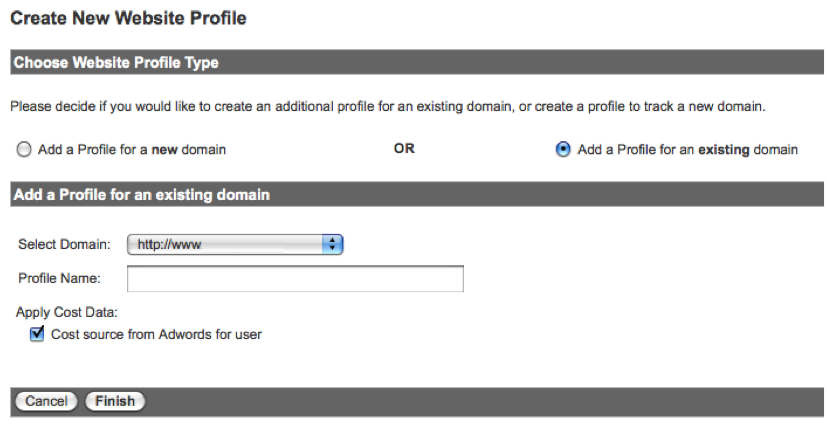
You want to Add a Profile for an existing domain and then select the domain and enter a Profile Name. I suggest something easy and descriptive like “Google Rank”.
When you’re done you’ll see a new profile appear in your Analytics Settings list. Don’t worry if you see a yellow triangle with an exclamation point in the Status column. The tracking for a new profile takes a bit of time to populate. As long as the current tracking for that domain is working, this will take care of itself.
Create Profile Filters
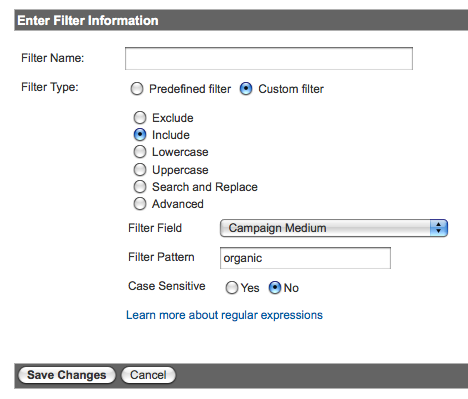
Click the Edit link next to your new profile so you can create three filters. The first ensures this profile will only report organic traffic.
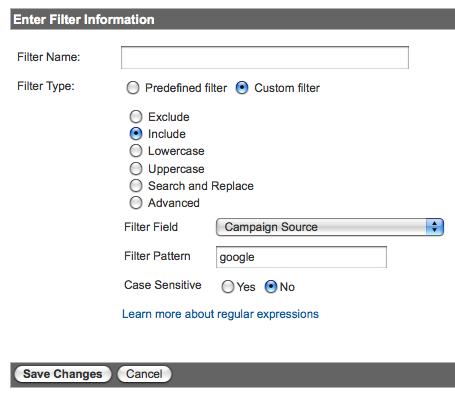
The second ensures this profile will only report Google traffic.
The third one is a bit more complicated and involves capturing the keyword rank using a regular expression in an Advanced Filter.
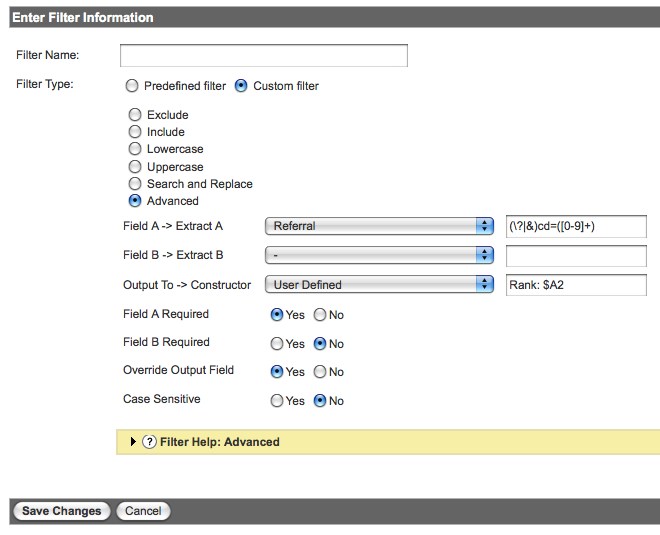
If the picture isn’t clear enough you want to enter: (\?|&)cd=([0-9]+)
All the regular expression is doing is looking for that special parameter (?cd= or &cd=) in the URL and then capturing the number (aka rank) after the cd= and using it in the User Defined field. You might be able to get away with just &cd=([0-9]+) but smart folks like Yoast are using both. I did a quick test and captured that data ($A1) and found 100% of it to be the ampersand (&). That said, I recommend covering your bases and match on both.
Remember to be sure to use $A2 since the number 2 refers to the second parenthesis where you’re capturing rank. If you’re interested (like I was) the advanced filters help on Google isn’t a bad read and this regex cheat sheet is a nice reference as well.
That’s it! Really, you’re done.
Wait and Review Your Keyword Ranking Reports
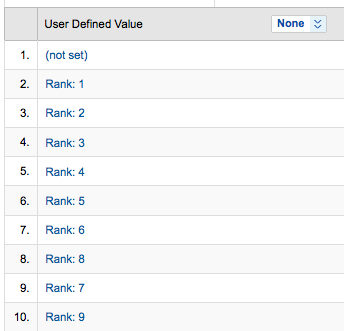
You’ll have to wait a day for the data to be collected since filters are not retroactive.
Wake up the next day and visit your new Google Rank profile. You’ll need to navigate to the User Defined section under Visitors. Once you click User Defined you’ll hopefully see a clean keyword ranking report. The (not set) value at the top indicates that no rank was captured, most likely because it was not an AJAX search result.
Now, there are other ways to configure these filters to combine keyword and rank, or exclude non-AJAX URLs. I’ve chosen to do it this way because I find it easier to view and more flexible in creating additional filters and custom reports. That’s not to say that you couldn’t create yet another profile to try different filter variations. Don’t be afraid to try (and break) things until you figure it out.
In my next post I’ll show you some ways to configure ranking reports and gain additional keyword insight.
The Next Post: Have Facebook and Google Killed Permission Marketing?
The Previous Post: When SEO Won’t Work

8 trackbacks/pingbacks
Comments About Track Keyword Rank in Google Analytics
// 15 comments so far.
webtretho // December 04th 2010
Look like a simplest solutions ever i seen, thanks for your post. try to use now 🙂
Joe // April 14th 2011
Many thanks for this I am setting it up now and look forward to the results
Scott // May 10th 2011
How long before it kicks in because it’s been 4 days and still no results for me.
Deborah // June 04th 2011
I was just about to *buy* a solution to this problem when I stumbled on this. I’ve set it up — eagerly awaiting the results. Thanks for posting this!
Hashim Warren // June 06th 2011
This article just saved me about $100 since I don’t have to buy a service to do the same thing.
aj // June 06th 2011
Thanks for the feedback Hashim. It’s encouraging to know people are using this technique.
Atul // July 06th 2011
Hello AJ,
Thanks for this useful post.
I got the following report when i applied the filter
Rank 30:
What does it mean ?
AJ Kohn // July 07th 2011
Atul,
A rank of 30 means that you received a click from a term that was ranked 30th, or bottom of page 3 for Google. You don’t see too many of those.
Bnpositive // August 23rd 2011
Just setup this profile for testing. Looking forward to seeing what we’ve netted after the Google data ships come into port for the evening.
Stephanie // April 19th 2012
I’m new to SEO. I have followed your steps and hope to have some results in soon. Will this allow me to get a report of our keywords and google rankings in one space? Is it possible to enter specific keywords somewhere? Thanks!
AJ Kohn // April 22nd 2012
Stephanie,
You’ll be able to see the rank associated with the keyword. You can use the filter feature in Google Analytics to find specific keywords. Custom reports may be the best way to look at this if you’re tracking things weekly.
Alex // June 06th 2012
Thanks, looks interesting. But what is the value to know that my website is ranked #2 or #10 if I don’t know exactly what keyword it was ranked for?!
Nikita // June 10th 2013
Thanks for the post AJ.
I setup a keyword rank profile in GA based on the instructions in your post, but for whatever reason, it isn’t reporting revenue data (we’re an e-Commerce site).
Is there anything about the technique described above that would prevent the keyword rank profile from reporting revenue?
suraj // September 24th 2013
I am still unable to find the page where i need to add this. I got Add Query Parameter option in Google analytic. What should i do here. I am not exactly a tech pro person. All helps and supports would be appreciated.
Dolap // August 30th 2016
Many thanks for this I am setting it up now and look forward to the results. But what is the value to know that my website is ranked #2 or #10 if I don’t know exactly what keyword it was ranked for?!
You can follow any responses to this entry via its RSS comments feed. You may also leave a trackback by clicking this link.