One of the biggest errors I see (consistently) in SEO and PPC analysis is using Excel’s AVERAGE function on Click Through Rate (CTR). As I mentioned in my SEO Pivot Tables post, do not do this. Here’s why averaging CTR is dangerous.
Take the following set of 10 data points.
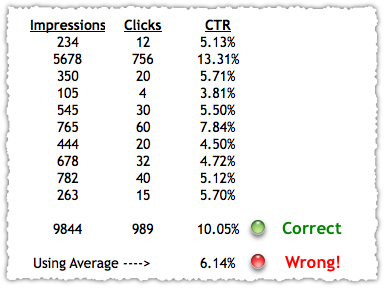
If you SUM all of the Impressions and Clicks and then do the CTR calculation you arrive at 10.05%. If you AVERAGE the 10 CTR percentages you arrive at 6.14%.
If I change the Clicks for these 10 data points I can produce the opposite effect.
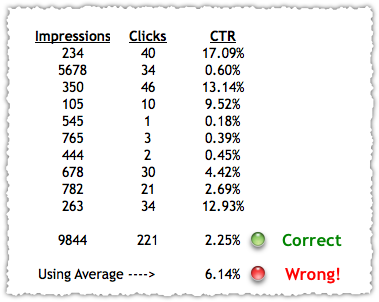
And will you look at that, the average CTR is the same in both instances. Can you see how misleading average can be here?
Don’t Average Click Through Rate
For years, I’ve used a structured Excel quiz in my hiring process that tests just this issue. In my experience upwards of 50% of applicants fail the quiz. If you’re pulling down data into Excel for PPC or SEO, make sure you don’t fall into this trap.
The Next Post: How To Get 100 Likes From 2 People
The Previous Post: Facebook Like Number Bookmarklets

Comments About Don’t Average CTR
// 6 comments so far.
Rob Diana // November 08th 2010
Ah yes, the difference between a basic average and a weighted average! It is amazing how many people miss the value of the difference.
Jeremy Post // November 08th 2010
Definitely important when calculating Average Position as well. For CPC reports, remember to multiply total impressions by average position for each line in your report (keyword, adgroup, campaign, etc).
Sum this column and divide by the sum or all impressions. This number is your true Average Position.
Joshua Schneiderman // August 06th 2015
I found this post (half a decade later) because I am curious, when looking for a weighted average of other metrics, what do you think makes most sense to determine weight, impressions, clicks, or something else altogether?
My particular instance: I am trying to report on the average search impression share lost to budget. A simple average doesn’t take into account the weight of each number, but what, most appropriately, does?
I would guess I’ll have already made a choice and moved forward by the time someone has an opportunity to respond, but I’ll try to remember to check back in to read your thoughts.
Take care.
AJ Kohn // December 21st 2015
I think I’d need to understand a bit more of what you’re trying to do here. But for a weighted average you just need to find the appropriate metric to apply that weight. So for a bunch of keywords you might want to weight things by impressions so you get a better sense of performance.
Vinicius Abouhatem // July 04th 2016
I’m facing the same problem here, but i can’t understand why you concludes that this way is betters.. I’m inclined to agree with you but i found a problem that i don’t have solution and questionates my decision.
My problem is calculate CTR (Click-through rate : # clicks / # views) for a period
Let’s say we have this situation:
Clicks : 1 1 1 1 1 1 1 1 1 1
Views : 1 1 1 1 1 1 1 1 1 100
Ideally, without the the last element(it’s probabily a outlier),we will say that the CTR is 1 right? But
Mean(of CTR by day) : 0.90100
Sum(clicks) / Sum(views) : 0.091743
In this situation the mean of means best fits our intution, because it’s limits the effect of outlier.
What do you think?
PS : Sorry for my bad english.
AJ Kohn // August 21st 2016
Vinicius,
You still need to do the calculation in the correct way. Using the average here might make more sense intuitively for this outlier but if you get into that habit you’ll wind up making a lot more mistakes on those that aren’t outliers.
What you can do is calculate both and when they differ so greatly you know there’s some volatile data that might bear more investigation and explanation.
Sorry, comments for this entry are closed at this time.
You can follow any responses to this entry via its RSS comments feed.